Workflows Module Recipe
The Workflows module is the admin surface for the workflow engine of your DaaS backend. A definition is a state machine: states, and commands that move an item from one state to another. An assignment says which definition the items of a collection get. An instance is one item on its way through its workflow.
The module gives you six screens:
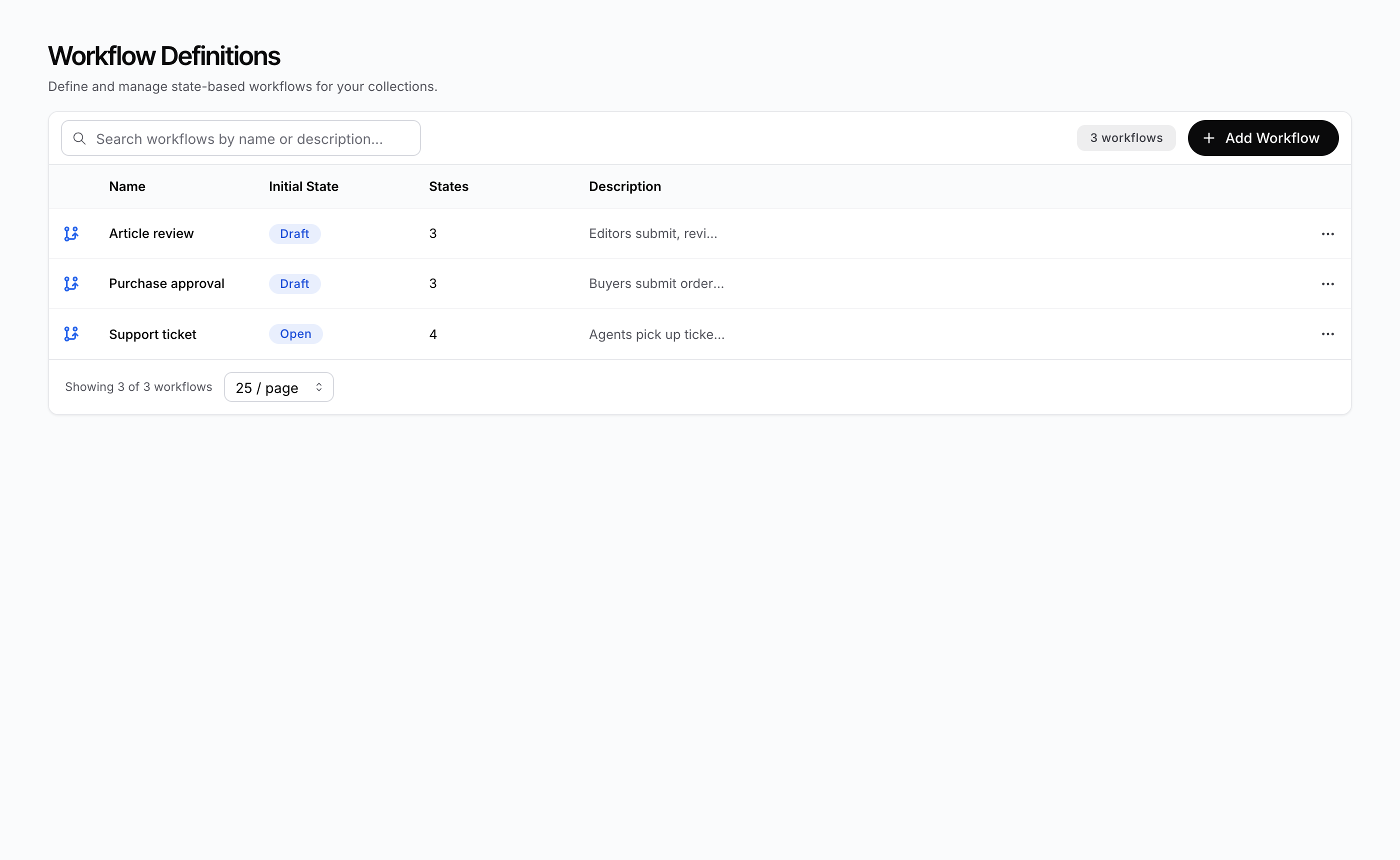
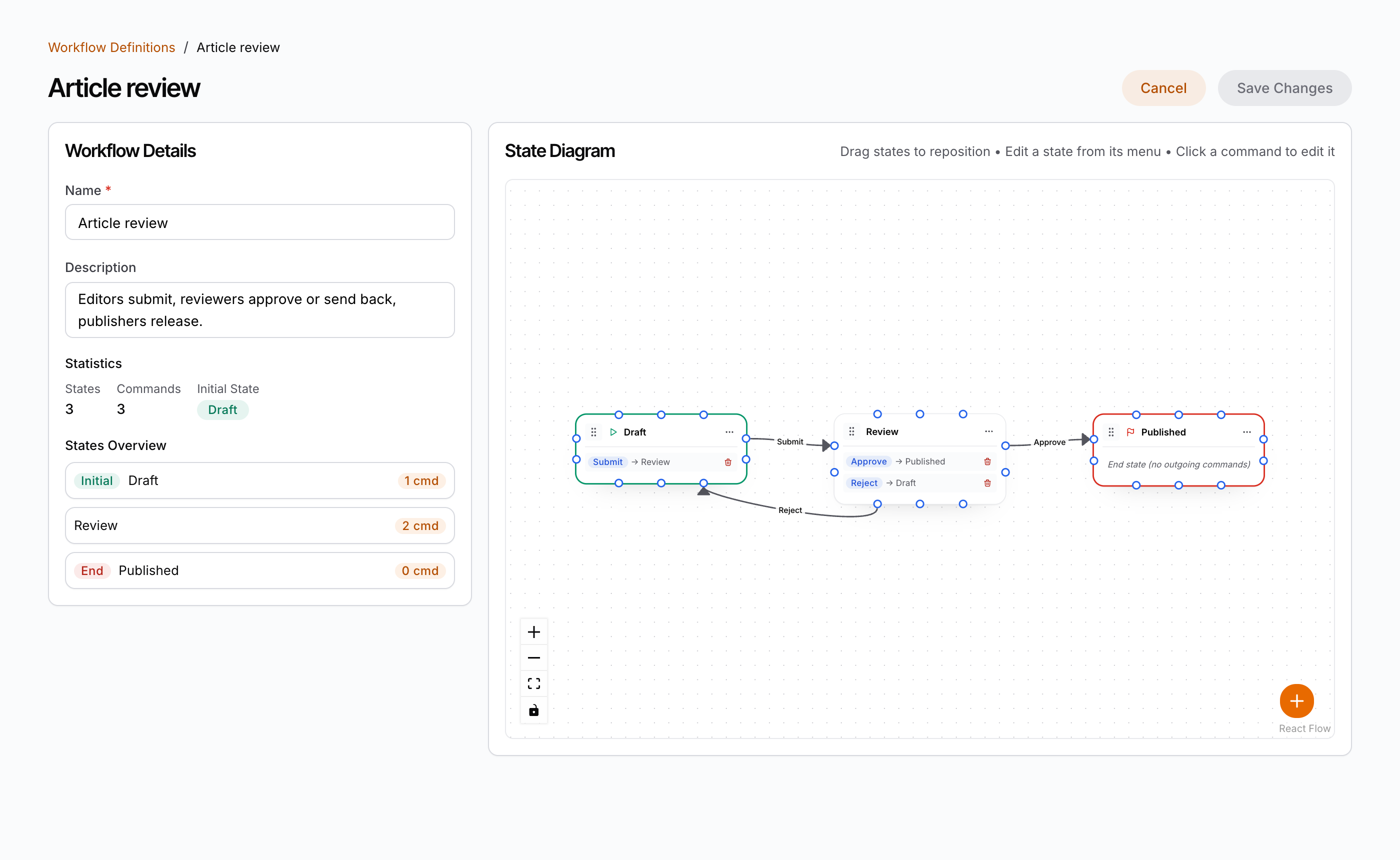
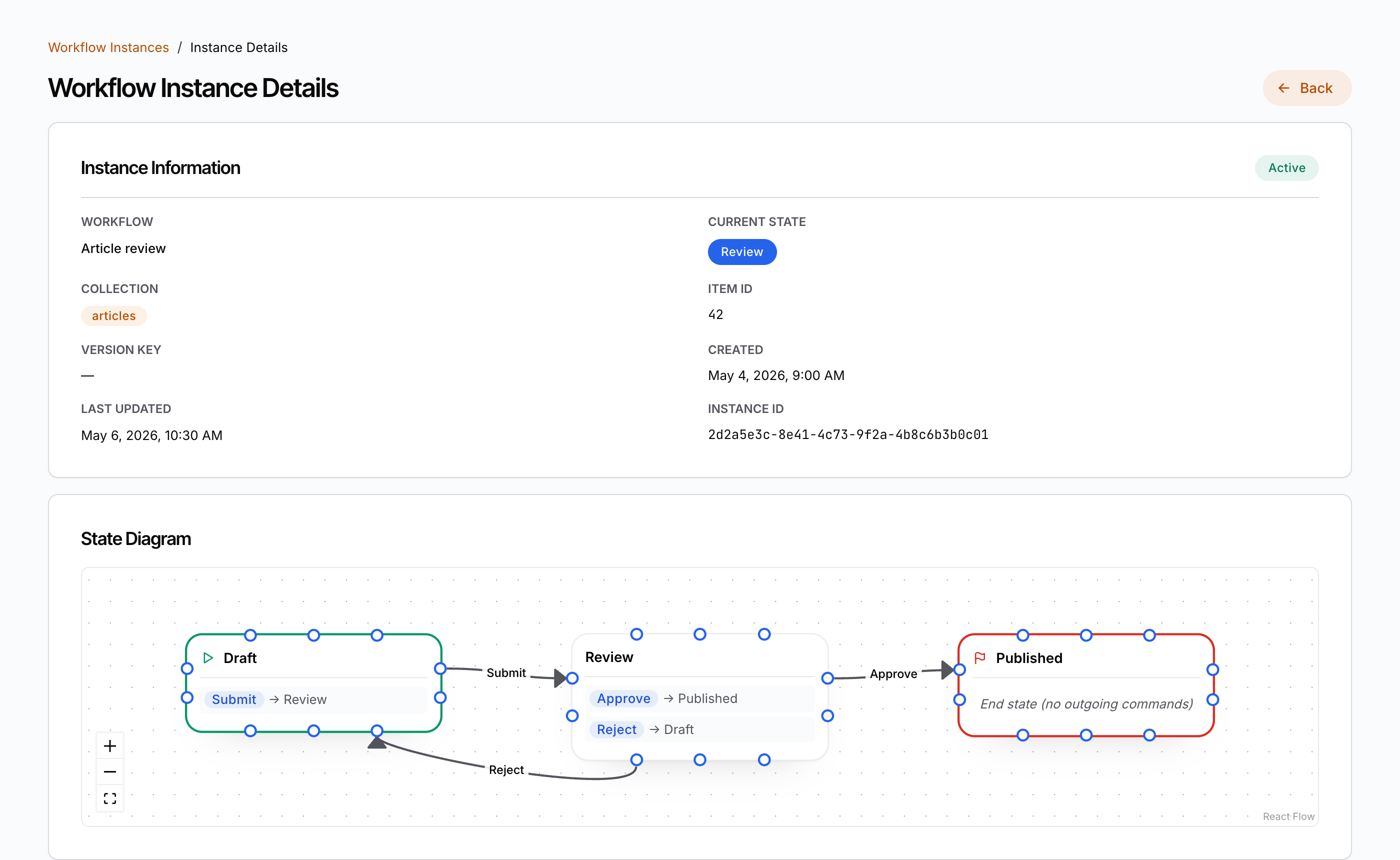
WorkflowsManager— the/workflowslist: search by name or description, pagination, and permission-gated create, edit and delete.WorkflowDetail— the/workflows/[id]editor: name, description, statistics, a states overview, and the state machine drawn as a diagram. States and commands are edited in dialogs or directly on the canvas. The whole machine is oneworkflow_jsondocument, saved with one request.WorkflowAssignmentsManager— the/workflow-assignmentslist: which workflow runs on which collection, and whether a filter rule narrows it.WorkflowAssignmentDetail— the/workflow-assignments/[id]form: the workflow, the collection, and an optional filter rule edited as JSON.WorkflowInstancesManager— the/workflow-instanceslist (read-only): search by collection, state or item id.WorkflowInstanceDetail— the/workflow-instances/[id]page (read-only): the instance’s fields, its workflow as a diagram, and the whole transition history, newest first.
This module administers workflows. The button that runs a command on one item
is a different component: the workflow-button interface
(Component Map).
The pieces
| Piece | Package | Role |
|---|---|---|
WorkflowsManager | @buildpad/ui-workflows | Definitions list: search, count, table, row menu (edit, delete), pagination |
WorkflowDetail | @buildpad/ui-workflows | Definition editor: form, statistics, states overview, diagram, State and Command dialogs |
WorkflowDiagram | @buildpad/ui-workflows | The state diagram on its own: states as cards, commands as arrows. Controlled by workflowJson; read-only with readOnly |
WorkflowStateModal | @buildpad/ui-workflows | Add/Edit State dialog: name, End State, Initial State |
WorkflowCommandModal | @buildpad/ui-workflows | Add/Edit Command dialog in three tabs: General (name, target state), Actions (events with JSON parameters), Policies (who may run it) |
WorkflowAssignmentsManager | @buildpad/ui-workflows | Assignments list: search by collection, table, row menu, pagination |
WorkflowAssignmentDetail | @buildpad/ui-workflows | Assignment form: Workflow picker, Collection picker, Filter Rule |
WorkflowInstancesManager | @buildpad/ui-workflows | Instances list (read-only) |
WorkflowInstanceDetail | @buildpad/ui-workflows | Instance detail (read-only): fields, diagram, transition history |
loadAllWorkflowPolicyOptions | @buildpad/ui-workflows | Reads every policy, page after page, as options for the Command dialog |
loadWorkflowCollectionNames | @buildpad/ui-workflows | Reads the collection names for the assignment form’s Collection picker |
VTable | @buildpad/ui-table | The table the three lists render |
useWorkflowDefinitions / useWorkflowAssignments / useWorkflowInstances | @buildpad/hooks | The data layer: list, get, create, update, delete, and the transition history |
DaaSRequestError | @buildpad/hooks | The typed error every method of those hooks rejects with |
| Workflow types and collection names | @buildpad/types | WorkflowDefinitionRecord, WorkflowJson, WORKFLOW_COLLECTIONS, … |
| Editor logic | @buildpad/utils | Pure functions that build, check and apply edits to a workflow_json document |
This recipe is opt-in — it is not part of bootstrap. Generate the
module with buildpad add workflows-routes; it pulls in the
workflow-management component (which in turn pulls the vtable component,
the types / hooks / services / utils lib modules, and the
@xyflow/react npm package). In a generated app the imports point at your
local copies (@/components/ui/workflow-management, @/lib/buildpad/hooks);
when consuming the packages directly, import from @buildpad/ui-workflows and
@buildpad/hooks instead.
Install
Add the module
buildpad add workflows-routesThis copies:
- six page shells into
app/[lang]/(authenticated)/workflows/,workflow-assignments/andworkflow-instances/; - the components into
components/ui/workflow-management/(22 files); - the
vtablecomponent intocomponents/ui/, when the app does not have it; - the workflow hooks, types and editor logic into
lib/buildpad/.
It also adds Workflows, Workflow Assignments and Workflow
Instances to the sidebar under an Automation group
(components/layout/navigation.ts — see
App Shell). Entries are matched
by href, so a second run does not duplicate them and your edits stay.
The sidebar labels are dictionary keys: app.nav.workflows,
app.nav.workflowAssignments, app.nav.workflowInstances, and
app.nav.automation for the group. A new app has them. An app created before
this module gets them with buildpad upgrade i18n; until then the sidebar
shows the English labels.
To install only the components, without pages or sidebar entries:
buildpad add workflow-managementInstall the diagram library
The diagram is drawn with React Flow
(@xyflow/react, MIT). In a terminal, buildpad add offers to install it,
pinned to ^12.9.3, before it validates the app.
Without a terminal (CI, a script, a coding agent) buildpad add does not
install anything it cannot ask about: it prints the command below and its
validation then fails on the missing module. In that case install the library
first, then add the module:
pnpm add "@xyflow/react@^12.9.3"You do not import its stylesheet. workflow-diagram.tsx imports
@xyflow/react/dist/style.css itself.
Point the app at your DaaS
The module has no proxy routes. The browser calls the DaaS directly: every
request goes to the URL in NEXT_PUBLIC_BUILDPAD_DAAS_URL, with the session
token that DaaSProviderWrapper supplies.
NEXT_PUBLIC_BUILDPAD_DAAS_URL=https://your-daas.example.comBecause the calls are cross-origin, the DaaS must allow your app’s origin
(its CORS_ORIGINS setting). Without that, every list shows its load-error
state.
The routes
Six files give you the whole module:
app/[lang]/(authenticated)/
├── workflows/
│   ├── page.tsx            # /workflows                  — WorkflowsManager
│   └── [id]/page.tsx       # /workflows/[id]             — WorkflowDetail (use /workflows/new to create)
├── workflow-assignments/
│   ├── page.tsx            # /workflow-assignments       — WorkflowAssignmentsManager
│   └── [id]/page.tsx       # /workflow-assignments/[id]  — WorkflowAssignmentDetail (use /workflow-assignments/new to create)
└── workflow-instances/
    ├── page.tsx            # /workflow-instances         — WorkflowInstancesManager
    └── [id]/page.tsx       # /workflow-instances/[id]    — WorkflowInstanceDetail
The components do not navigate. Each page passes router callbacks, so your router (and its locale prefix) decides where a click goes.
The list views
Each list page renders its manager wired to the router. A click on a row opens
the detail page. The create button navigates to the new route.
"use client";

import React from 'react';
import { useLocaleRouter } from '@/lib/i18n/navigation';
import { WorkflowsManager } from '@/components/ui/workflow-management';

export default function WorkflowsPage() {
  const router = useLocaleRouter();

  return (
    <WorkflowsManager
      onWorkflowClick={(workflow) => router.push(`/workflows/${workflow.id}`)}
      onCreateWorkflow={() => router.push('/workflows/new')}
    />
  );
}
The assignments page is the same with onAssignmentClick and
onCreateAssignment. The instances page has only onInstanceClick: instances
are created by the backend and change only through a transition.
A row opens for every user who can read the list. A user without update access gets the detail page read-only.
A load that fails is never drawn as an empty list. A refusal draws an access-denied state. Any other failure draws a load-error state with the server’s message, and a notification. A failed delete keeps the confirm dialog open and shows the server’s message, so the user can retry or cancel. After a delete empties the last page, the list loads the page before it.
URL state (shareable views)
The three lists keep their search and page in the query string by default —
?search=…&page=2 — so a view can be shared, reloaded or bookmarked. Writes
replace the current history entry and wait for the 300 ms search debounce.
Defaults (empty search, page 1) stay off the URL.
In a Next.js App Router app the writes go through router.replace, which the
DaaSProviderWrapper template registers with registerUrlStateWriter. This
is required there. If you have customised DaaSProviderWrapper, keep that
registration.
Turn it off for an embedded list with urlParams={false}. Use
urlParamPrefix="wf-" when two lists share one page.
The detail views
A detail page reads the route parameter and passes it as id. For
definitions and assignments, id="new" means create.
"use client";

import React, { use } from 'react';
import { useLocaleRouter } from '@/lib/i18n/navigation';
import { WorkflowDetail } from '@/components/ui/workflow-management';

export default function WorkflowDetailPage({
  params,
}: {
  params: Promise<{ id: string }>;
}) {
  const { id } = use(params);
  const router = useLocaleRouter();

  return (
    <WorkflowDetail
      id={id}
      onBack={() => router.push('/workflows')}
      onSaved={() => {
        if (id === 'new') router.push('/workflows');
      }}
    />
  );
}
Navigate after a create. A detail component does not navigate. After a
successful create it goes on as the editor of the stored record: a further
Save updates that record, and does not create a second one. The URL still says
/workflows/new, though, and a reload would open an empty form. onSaved
receives the saved record with its new id. Navigate there to the list (as the
generated pages do) or to /workflows/${workflow.id}.
The generated pages follow the reference admin UI: the definition editor returns to the list after a create and stays open after an update; the assignment form returns to the list after every save.
onBack is called by Cancel, by the breadcrumb, and by the Back button of the
not-found, access-denied and load-error states. Without onBack none of those
controls is drawn.
Component props
Every component also takes translations, a partial override of the
workflows dictionary namespace for that one instance.
The three lists
| Prop | Lists | Default | Purpose |
|---|---|---|---|
onWorkflowClick(workflow) | WorkflowsManager | — | Row click, and the row menu’s Edit |
onCreateWorkflow() | WorkflowsManager | — | The Add Workflow button |
onAssignmentClick(assignment) | WorkflowAssignmentsManager | — | Row click, and the row menu’s Edit |
onCreateAssignment() | WorkflowAssignmentsManager | — | The New Assignment button |
onInstanceClick(instance) | WorkflowInstancesManager | — | Row click, and the row’s View Details button |
pageSize | all | 25 | Initial rows per page |
pageSizeOptions | all | [10, 25, 50, 100] | Choices of the footer’s page-size selector |
hideHeader | all | false | Hide the heading and subtitle of an embedded list. The create button stays |
urlParams | all | true | Keep search and page in the query string |
urlParamPrefix | all | '' | Prefix for the managed URL parameters |
workflowsCollection | WorkflowsManager | 'daas_wf_definition' | Collection the permission checks use |
assignmentsCollection | WorkflowAssignmentsManager | 'daas_wf_assignment' | Collection the permission checks use |
WorkflowDetail
| Prop | Default | Purpose |
|---|---|---|
id (required) | — | Id of the definition, or 'new' |
onBack() | — | Cancel, breadcrumb, and the Back button of the failure states |
onSaved(workflow) | — | Called after a successful create or update with the saved definition |
workflowsCollection | 'daas_wf_definition' | Collection the permission checks use |
readOnly | false | Show the definition with no way to change it. A user without update access gets this view in any case |
policies | — | The policies the Command dialog offers. Pass every policy, not one page |
loadPolicies() | all policies, through usePolicies | Loads the policies the Command dialog offers. Yours is called each time the dialog opens; the default reads every policy once per editor and needs read access to daas_policies |
diagramHeight | 600 | Height of the diagram (pixels or a CSS length) |
hideAttribution | false | Hide React Flow’s attribution; see Prerequisites |
WorkflowAssignmentDetail
| Prop | Default | Purpose |
|---|---|---|
id (required) | — | Id of the assignment, or 'new' |
onBack() | — | Cancel, breadcrumb, and the Back button of the failure states |
onSaved(assignment) | — | Called after a successful create or update with the stored assignment |
assignmentsCollection | 'daas_wf_assignment' | Collection the permission checks use |
readOnly | false | Show the assignment with no way to change it |
workflows | — | The definitions the Workflow picker offers ({ id, name }). Pass every definition |
loadWorkflows() | useWorkflowDefinitions().fetchAllDefinitions | Loads the Workflow picker’s options. The default needs read access to daas_wf_definition |
collections | — | The collection names the Collection picker offers. Use it to leave out collections that hold no content items |
loadCollections() | loadWorkflowCollectionNames | Loads the Collection picker’s options from GET /api/collections |
When the collections cannot be listed, the Collection field becomes a text
field, so the form still works. One backend serves /api/collections to
administrators only.
The Filter Rule is a DaaS filter object. Valid JSON that is not an object
([], 123, "x") is refused on the field and nothing is sent. An empty
field means no rule.
WorkflowInstanceDetail
| Prop | Default | Purpose |
|---|---|---|
id (required) | — | Id of the instance |
onBack() | — | Back button, breadcrumb, and the Back button of the failure states |
showDiagram | true | Draw the instance’s workflow as a read-only diagram |
diagramHeight | 420 | Height of the diagram |
hideAttribution | false | Hide React Flow’s attribution |
The diagram does not mark the current state. The Current State field does.
WorkflowDiagram
Use it on its own to show a workflow on another page.
| Prop | Default | Purpose |
|---|---|---|
workflowJson (required) | — | The state machine to draw. The diagram draws this document and nothing else |
onChange(workflowJson) | — | Called with the next document after a gesture: a state moved, a state or command deleted, an edge moved to another state |
onEditState(state) | — | A state’s Edit State menu item |
onEditCommand(stateName, command) | — | A click on a command, on its row or on its arrow |
onAddState() | — | The ”+” button, and the button of the empty canvas |
onAddCommand(fromState, toState?, sourceHandle?, targetHandle?) | — | A connection drawn from one state to another, or a state’s Add Command menu item (then with fromState only) |
readOnly | false | No drag, no connect, no menus, no delete. Select, pan and zoom still work |
height | 600 | Height of the canvas |
hideAttribution | false | Hide React Flow’s attribution |
import { WorkflowDiagram } from '@/components/ui/workflow-management';

<WorkflowDiagram workflowJson={definition.workflow_json} readOnly height={360} />
The canvas is a view of workflowJson. A gesture does not change the canvas.
It produces the next document and hands it to onChange; the canvas redraws
when that document comes back in workflowJson.
WorkflowStateModal and WorkflowCommandModal
WorkflowDetail renders both. Use them directly only when you build your own
editor around WorkflowDiagram.
| Prop | Dialog | Purpose |
|---|---|---|
opened, onClose() (required) | both | Dialog visibility |
workflowJson (required) | both | The document the state or command belongs to |
state (required) | State | The stored state to edit, or null to add one |
onSave(state, isNew, isInitial) (required) | State | The state to store. Apply it with applyWorkflowStateSave |
command (required) | Command | The stored command to edit, or null to add one |
stateName (required) | Command | The state the command leaves |
targetState, sourceHandle, targetHandle | Command | Start values for a command that was drawn on the diagram |
onSave(command, isNew) (required) | Command | The command to store. Apply it with applyWorkflowCommandSave |
policies / loadPolicies() | Command | The options of the Policies tab. They must be every policy, not one page |
The editor
- A state is dragged by its grip. A click on a state card only selects it.
- A state is edited from its menu. A command is edited by a click on its row or on its arrow.
- A command is added by dragging from a blue dot of one state to another state. The Command dialog opens with the target filled in.
- A command is also added from the state’s menu (Add Command). The Command dialog then asks for the target. This is the way to add a command with the keyboard: a connection can only be drawn with a pointer.
- An arrow can be moved to another state.
- Backspace or Delete removes the selected state or command from the document. The last state cannot be deleted.
- An end state has no outgoing commands. Its dots start no connection, an arrow cannot be moved to start from it, and End State cannot be turned on for a state that has commands.
- Save Changes is disabled while there is nothing to save. An update sends only the keys that changed.
A command is saved on top of the stored command, so keys the dialog has no field for are kept.
An action’s Parameters must be a JSON object. Text that is not JSON, and JSON
that is not an object ([], 123, "x"), is refused on the field. The save
opens the tab and the action that hold it. An empty field means no parameters.
A definition can be answered without its workflow_json, when the user’s read
grant on daas_wf_definition leaves that field out. The editor then shows a
notice in place of the statistics and the diagram. It does not draw an empty
machine, and it never sends the document. The name and the description can
still be saved.
The data layer
The screens are thin. The work is in three hooks that you can use anywhere
under DaaSProvider.
import { useWorkflowDefinitions, DaaSRequestError } from '@/lib/buildpad/hooks';

const { fetchDefinitions, getDefinition } = useWorkflowDefinitions();

const { items, total, totalPages } = await fetchDefinitions({ search: 'approval', page: 1, limit: 25 });
Each hook returns loading, error (the last failure’s message),
errorInfo (the same failure as a DaaSRequestError), and its methods:
| Hook | Route | Methods |
|---|---|---|
useWorkflowDefinitions | /api/workflows | fetchDefinitions(params), fetchAllDefinitions({ search? }), getDefinition(id), createDefinition(data) → the new id, updateDefinition(id, data), deleteDefinition(id) |
useWorkflowAssignments | /api/workflow-assignments | fetchAssignments(params), getAssignment(id), createAssignment(data) → the stored row, updateAssignment(id, data) → the stored row, deleteAssignment(id) |
useWorkflowInstances | /api/workflow-instances | fetchInstances(params), getInstance(id), fetchInstanceHistory(instanceId) → every transition, newest first |
A list method takes { page?, limit?, search? } (defaults: page 1, 25 rows)
and resolves to a WorkflowListResult<T>:
interface WorkflowListResult<T> {
  items: T[];         // rows of this page
  total: number;      // rows matching the request across all pages
  totalPages: number; // at least 1
  page: number;       // page that was served
  limit: number;      // page size that was served
}
Four details matter when you call the hooks yourself:
fetchDefinitionsreturns one page. For a picker, usefetchAllDefinitions, which reads every page.updateDefinitionresolves to nothing. Read the definition again withgetDefinitionwhen you need the stored form.description: nullclears the description.- A
WorkflowDefinitionRecordhas noworkflow_jsonwhen the caller’s grant withholds that field. This is not an empty machine: do not draw one, and do not send one back. deleteDefinitionis refused (kind: 'invalid') for a definition that is assigned to a collection or has instances. The message says which.
Typed errors
Every method rejects with a DaaSRequestError. It is an Error whose
message is a readable sentence, with three more fields:
| Field | Value |
|---|---|
kind | What the failure means; branch on this |
status | The HTTP status, or null when the request got no answer |
code | The backend’s error code (NOT_FOUND, FORBIDDEN, MFA_REQUIRED, …), or null |
kind | Meaning |
|---|---|
notFound | The record does not exist, or the caller’s row rule hides it (404). Also an id that is not a valid id |
forbidden | The caller may not do this (403) |
mfaRequired | The session must pass a second factor first (403 with code MFA_REQUIRED) |
unauthenticated | No valid session (401) |
invalid | The request was refused as sent (400, 409, 422). message says why |
failure | Anything else: a 5xx, a network error, an answer that is not what the route promises |
try {
  const instance = await getInstance(id);
} catch (err) {
  if (err instanceof DaaSRequestError && err.kind === 'notFound') {
    // draw a not-found state
  }
}
A failed load never resolves to an empty list, and a get never resolves
without a record.
Editor logic
The functions that build and check a workflow_json document are pure and
live in @/lib/buildpad/utils: buildWorkflowCommand, buildWorkflowState,
applyWorkflowCommandSave, applyWorkflowStateSave, removeWorkflowState,
removeWorkflowCommand, moveWorkflowState, reconnectWorkflowCommand,
findWorkflowCommandProblem, findWorkflowStateProblem,
findWorkflowConnectionProblem, findWorkflowDefinitionProblem,
normalizeWorkflowJson, isWorkflowFilterRule and parseWorkflowFilterRule.
Use them when you write a custom editor, so your saves keep the keys your
form does not show.
Permissions
The checks use the collection names both backends enforce. They are exported
from @/lib/buildpad/types as WORKFLOW_COLLECTIONS.
| Collection | Holds | What the UI does with it |
|---|---|---|
daas_wf_definition | Workflow definitions | WorkflowsManager shows Add, Edit and Delete with create, update and delete. WorkflowDetail is read-only without update, and draws access-denied on /workflows/new without create |
daas_wf_assignment | Assignments of a workflow to a collection | The same gates on WorkflowAssignmentsManager and WorkflowAssignmentDetail |
daas_wf_instance | One instance per item | No check in the UI. The API’s answer decides: a refusal draws the access-denied state |
daas_wf_history | The transitions of an instance | No check in the UI. Without read access the history card of WorkflowInstanceDetail says the history cannot be read |
- The gates come from
usePermissions().canPerform(collection, action). Administrators pass every gate. - Until the permissions are known, no write control is drawn and the editors
take no edit: no Add or New button, no row menu, no Save button, a covered
form, and a diagram without its edit controls. The controls appear when the
answer is in, so a user without a right does not see its button first. A
newroute does not open its form and does not draw access-denied before then. Reading does not wait: the lists and the records load at once. A later refresh of the permissions (a renewed token, another scope) keeps the controls as they were until its answer is in. - A row menu with no allowed action is not drawn.
- The gates only hide controls. The API enforces the same collections, so a hidden button is not the protection.
- Gate your navigation links too, so a user without read access to
daas_wf_definitiondoes not see the Automation group. - Two pickers read other collections: the Command dialog’s Policies tab reads
daas_policies, and the assignment form’s Workflow picker readsdaas_wf_definition. A failed load is a notification, and the stored value is kept.
Who may run a command
A command stores two lists: policies (policy ids) and module_access_keys.
A caller who holds any listed policy or any listed key may run the
command. A command with neither list is open to every authenticated user.
The Command dialog edits policies. It has no field for
module_access_keys: it keeps the stored keys on save and shows a notice that
the command is gated by them. Set the keys through the API.
Both backends
The module works against the Next.js DaaS (Supabase) and the Go engine. The
hooks read both pagination vocabularies (count / totalCount /
totalPages, and meta.filter_count / meta.total_pages), accept
data: null as an empty page, and always send page and limit.
The routes it calls:
GET,POST/api/workflows;GET,PATCH,DELETE/api/workflows/[id]GET,POST/api/workflow-assignments;GET,PATCH,DELETE/api/workflow-assignments/[id]GET/api/workflow-instances,/api/workflow-instances/[id]and/api/workflow-instances/[id]/historyGET/api/permissions/me(the gates),/api/policies(the Policies tab) and/api/collections(the Collection picker)
Prerequisites
DaaSProviderabove the pages. The module installs under the authenticated layout, whereDaaSProviderWrappersupplies the DaaS URL, the session token and the tenant scope header.<Notifications />from@mantine/notificationsmounted once. Saves, deletes and failed loads report through it. The generated root layout mounts it.- An i18n provider for a language other than English. The strings are the
workflowsnamespace, shipped in English and Indonesian. The generatedI18nProviderselects the catalog for the active locale. To change a string, set it underbuildpad.workflowsin your dictionary, or passtranslationsto one component. Without a provider the components render the English defaults. @xyflow/react^12.9.3in yourpackage.json.- React Flow’s attribution. The diagram shows a small “React Flow” link in
a corner of the canvas.
hideAttributionremoves it. React Flow is MIT licensed, and its authors ask organisations that remove the attribution to support the project . The default leaves it on; the decision is yours. - No extra styling. The components use the design tokens through the Mantine theme and follow the color scheme. See the Styleguide.
See the components live
Every surface is in the Workflows Storybook. Run it locally with
pnpm storybook:workflows (port 6013). The fixture stories run on mock data.
The Live DaaS stories of WorkflowsManager, WorkflowDetail,
WorkflowAssignmentsManager and WorkflowInstancesManager connect to a real
DaaS instance through the storybook-host proxy (pnpm dev:host).