AI Chat Module Recipe
The AI Chat module puts an assistant in your app. It talks to an agent you create in Chocolate Factory (its model, system prompt, knowledge base and tools are configured there) and streams the agent’s answers into a chat.
The module gives you two layouts:
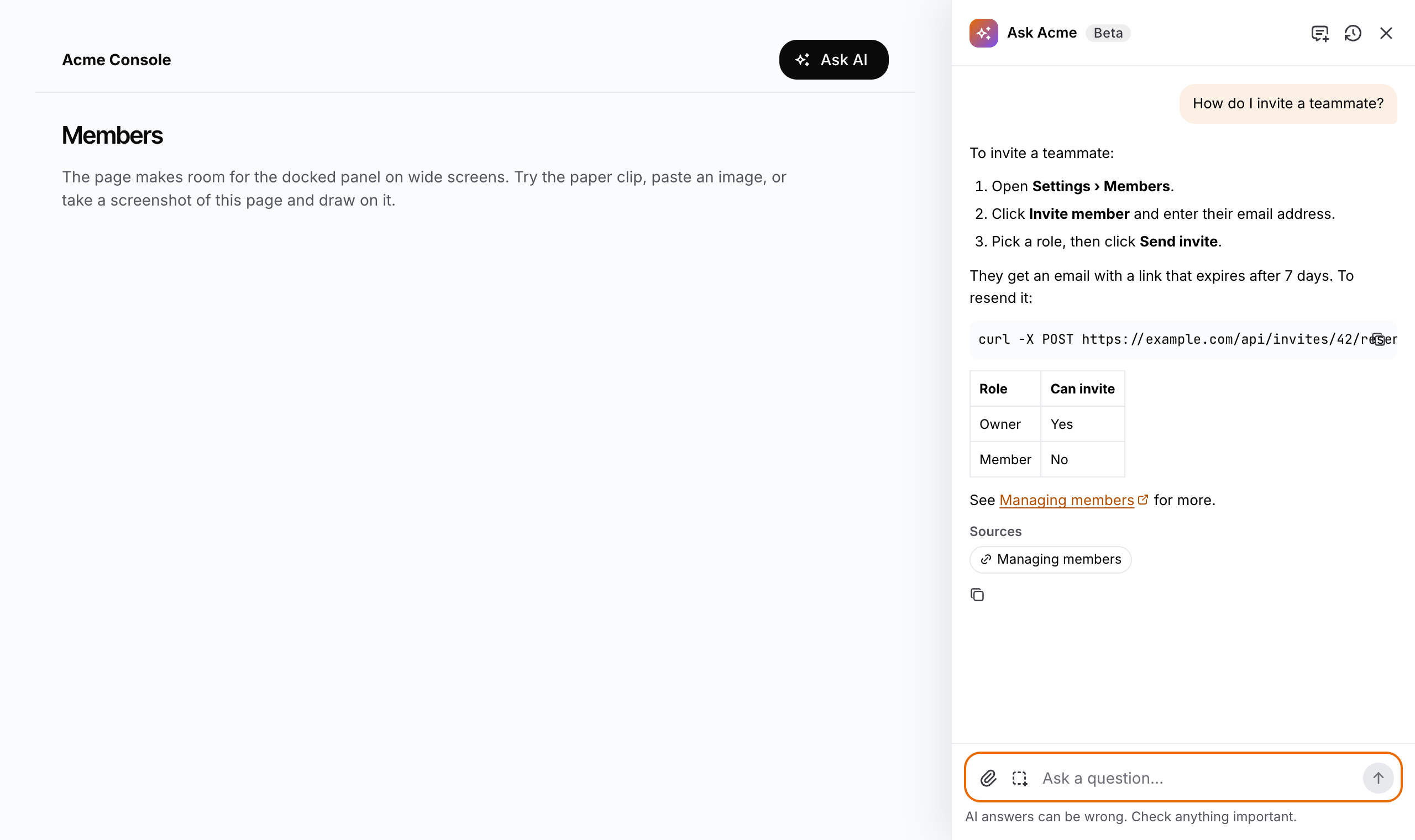
AiChatPanel— a panel docked to the right edge at full height. On a wide screen the page makes room for it, so an answer sits beside the screen it explains; on a narrower one it overlays the page; on a phone it fills the screen. Open it from an Ask AI button in your header, or with ⌘ I on macOS and Ctrl I elsewhere.AiChatWidget— a launcher bubble in a bottom corner that opens a chat window above it, for customer-facing apps.
Both show the same chat: streaming Markdown answers (code blocks with a copy button, tables, links), one working word while the agent searches or thinks, Stop and Try again, Copy answer, starter questions, a recent-chats list, and images: attach them with the paper clip, paste them, drop them, or take a screenshot of the page (drag over the part to show, then draw on it).
The pieces
| Piece | Package | Role |
|---|---|---|
AiChatPanel | @buildpad/ui-chat | The chat docked to the right edge; sets --bp-ai-chat-offset while docked |
AiChatWidget | @buildpad/ui-chat | The chat as a floating launcher and window |
AiChatButton | @buildpad/ui-chat | Header button that opens and closes the chat, with the shortcut in its tooltip |
AiChatProvider / useAiChat | @buildpad/ui-chat | Open/closed state shared by the button and the panel, and the keyboard shortcut |
AiChat | @buildpad/ui-chat | The chat itself (header, thread, question box), for a shell of your own |
AiChatContextChip | @buildpad/ui-chat | A chip for the context slot, saying what the agent is told about |
chocolateFactoryBackend / useChocolateFactoryConfig | @buildpad/ui-chat | Browser-direct backend, and the hook that reads its settings from your config route |
routeBackend | @buildpad/ui-chat | Backend for your own proxy route |
| Strings | @buildpad/utils | The chat dictionary namespace (English and Bahasa Indonesia) |
This recipe is opt-in — it is not part of bootstrap. Generate the
module with buildpad add ai-chat-routes; it pulls in the ai-chat component
and the services / utils lib modules, and installs ai, @ai-sdk/react,
react-markdown, remark-gfm, use-stick-to-bottom and @zumer/snapdom. In a
generated app the imports point at your local copy
(@/components/ui/ai-chat).
Choose a backend
The chat reaches the agent one of two ways. The choice is about where the Chocolate Factory key lives and whether answers can stream.
| Browser-direct (default) | Server proxy | |
|---|---|---|
| CLI target | ai-chat-routes | ai-chat-proxy-routes |
| Route | GET /api/ai-chat/config | POST /api/ai-chat, GET /api/ai-chat/history |
| Backend | chocolateFactoryBackend(config) | routeBackend() |
| The key | Visible to the browser | Stays on the server |
| Streams on Amplify Hosting | Yes | No — the route is a buffered Lambda (~30 s): answers arrive at once, long ones time out |
| Streams on a Node server | Yes | Yes |
| Conversations kept | In the browser (local storage, without image data) | In Chocolate Factory, linked to the browser by a signed token |
Amplify Hosting runs a Next.js API route as a Lambda that buffers its whole response, so a streamed answer can’t pass through your own route there. The browser-direct backend calls Chocolate Factory itself, which is why it streams everywhere — and why the browser needs the key.
Browser-direct shows the key to anyone who loads the page. Chocolate
Factory’s agent keys (agk_…) reach only one agent, but its CORS headers don’t
allow their x-agent-key header from browsers yet, so a browser call needs a
project key (cf_…), which reaches every agent in the project. Protect the
config route with your app’s auth, keep the project’s other agents harmless,
or use the server proxy on a host where it can stream.
Install
Add the module
buildpad add ai-chat-routesor, for the server proxy:
buildpad add ai-chat-proxy-routesThis copies the route files into app/api/ai-chat/ (and, for the proxy,
lib/ai-chat/server.ts), and the components into components/ui/ai-chat/
(20 files). To install only the components:
buildpad add ai-chatConnect Chocolate Factory and set the agent
Connect Chocolate Factory on the project’s Connectors page in the Buildpad
Platform; that gives the project CHOCOLATE_FACTORY_BASE_URL and
CHOCOLATE_FACTORY_API_KEY. Then copy your agent’s ID from its page in the
Chocolate Factory Portal.
CHOCOLATE_FACTORY_BASE_URL=https://app.chocolatefactory.ai
CHOCOLATE_FACTORY_API_KEY=cf_…
CHOCOLATE_FACTORY_AGENT_ID=…
# Server proxy only: 32+ random characters that sign conversation tokens
AI_CHAT_SECRET=…
CHOCOLATE_FACTORY_AGENT_KEY (an agk_… key from the agent’s Integrations
section) takes precedence over CHOCOLATE_FACTORY_API_KEY when set. Use it with
the server proxy; with browser-direct, leave it unset for now — the config
route would hand it to the browser, and Chocolate Factory’s CORS headers refuse
the header it travels in, so every answer would fail. The routes read these at
request time; on Amplify, add them to the app’s environment variables and
redeploy.
Configure the agent
In the Chocolate Factory Portal, turn the agent’s Memory off: every user of your app reaches it with the same key, so Chocolate Factory sees them as one user, and something one person tells the agent could come up in another’s answers. Give it a knowledge base or an MCP server with your docs, so its answers are grounded in them.
Mount it
Docked panel
Wrap the layout in AiChatProvider, put the button in the header and the panel
at the layout’s edge, and let the main area make room:
'use client';

import { AiChatPanel, chocolateFactoryBackend, useChocolateFactoryConfig } from '@/components/ui/ai-chat';

export function Assistant({ userId }: { userId: string }) {
  const config = useChocolateFactoryConfig(); // GET /api/ai-chat/config
  if (!config) return null; // not configured: no chat
  return (
    <AiChatPanel
      backend={chocolateFactoryBackend(config)}
      title="Ask Acme"
      storageKey={userId}
      suggestions={['How do I invite a teammate?', 'Where do I change my plan?']}
    />
  );
}<AiChatProvider>
<header>… <AiChatButton /> …</header>
<main style={{ marginInlineEnd: 'var(--bp-ai-chat-offset, 0)', transition: 'margin 200ms ease' }}>
{children}
</main>
<Assistant userId={user.id} />
</AiChatProvider>The panel sets --bp-ai-chat-offset on <html> only while it is open and
docked (from 75em, the dockFrom prop). Set --bp-ai-chat-header-height if
your header isn’t 60 px tall, so the panel’s header lines up with it.
Floating widget
<AiChatWidget backend={chocolateFactoryBackend(config)} title="Acme Support" greeting="Hi! How can we help today?" />It keeps its own open state, or shares AiChatProvider’s with an AiChatButton.
Server proxy
<AiChatPanel backend={routeBackend()} title="Ask Acme" storageKey={userId} />lib/ai-chat/server.ts binds conversations to an HttpOnly cookie, so it works
without sign-in. Behind your app’s auth, make chatOwner return the signed-in
user’s id and reject anonymous requests in the two routes.
Tell the agent where the user is
vars are sent with every message as Chocolate Factory template variables, so
the agent’s system prompt can use them ({{page}}, {{user_name}}, …). Pair
them with an AiChatContextChip in the context slot, so the user sees what is
shared and can stop sharing:
const [share, setShare] = useState(true);

<AiChatPanel
  backend={backend}
  vars={() => (share ? { page: 'Settings › Members', page_path: pathname } : undefined)}
  context={
    share ? (
      <AiChatContextChip label="Settings › Members" title={pathname} onRemove={() => setShare(false)} removeLabel="Don't share this page" />
    ) : null
  }
/>
Props
Shared by AiChat, AiChatPanel and AiChatWidget:
| Prop | Type | Default | Notes |
|---|---|---|---|
backend | AiChatBackend | required | chocolateFactoryBackend(config) or routeBackend() |
title | string | ”Assistant” | Header title |
badge | string | — | e.g. “Beta” |
greeting | string | ”How can I help?” | Empty-state heading |
description | string | — | Empty-state text |
suggestions | string[] | [] | Starter questions |
placeholder | string | ”Ask a question…” | |
disclaimer | string | ”AI answers can be wrong. Check anything important.” | Under the question box |
vars | object | () => object | — | Template variables sent with every message |
context | ReactNode | — | Above the question box |
features | { attachments?, screenshot?, recentChats? } | all on | |
storageKey | string | "default" | Scopes recent chats in local storage — pass the user’s id |
linkTarget | (href) => '_self' | '_blank' | app pages in place, others in a new tab | |
onNavigate | (href) => void | — | Client-side navigation for in-place links, e.g. router.push |
imageHosts | string[] | [] | Hosts an answer may show images from; others show their alt text |
translations | DeepPartial<ChatTranslations> | — | Per-instance strings |
onError | (error) => void | console.error |
AiChatPanel adds opened, onClose, width (420) and dockFrom (75em);
without opened/onClose it follows AiChatProvider. AiChatWidget adds
opened, onOpenChange, defaultOpened, position (bottom-right or
bottom-left), launcherLabel and width (400). AiChatProvider takes
hotkey (mod+I; null turns it off) and defaultOpened.
Strings and theme
Every string comes from the chat namespace of the shared dictionary, in
English and Bahasa Indonesia; override them app-wide with
BuildpadI18nProvider, or per instance with translations. The styles are
plain CSS (bp-ai-chat-* classes) drawn with Mantine variables and the
--ds-* design tokens, so the chat follows your theme and colour scheme.
--bp-ai-chat-width and --bp-ai-chat-z-index (180, below Mantine modals) can
be overridden.