Users Module Recipe
The Users module is a ready-made admin surface for the three interdependent access-control domains of your DaaS backend — users, roles, and policies. Instead of hand-building user tables, role assignment, policy attachment, and a permissions matrix, you scaffold the whole thing with one command and own the code.
It gives you six screens:
UsersManager— the/userslist: search, role/status filters, pagination, status badges, and permission-gated create/edit/delete.UserDetail— the/users/[id]page: profile fields, password rules, role assignment (M2M), status, a static API token field (generate → plaintext shown once with Copy, saved tokens display “Value Securely Saved”, Clear revokes), plus a Policies tab for direct policy attachment.RolesManager— the/roleslist with member counts.RoleDetail— the/roles/[id]page: icon, parent role (hierarchy), scope-assignment rules (regex allow-list), plus Users (membership management, move/remove in bulk) and Policies tabs. The sidebar links the role hierarchy — parent role and child roles navigate viaonRoleClick.PoliciesManager— the/policieslist with user/role attachment counts.PolicyDetail— the/policies/[id]page: access flags (app_access,admin_access,delegate_access) and the per-collection permissions matrix (create/read/update/delete/share), powered by thesystem-permissionsinterface — including a custom permission editor (item filters, field access, validation, presets) behind each toggle’s “Use Custom” option.
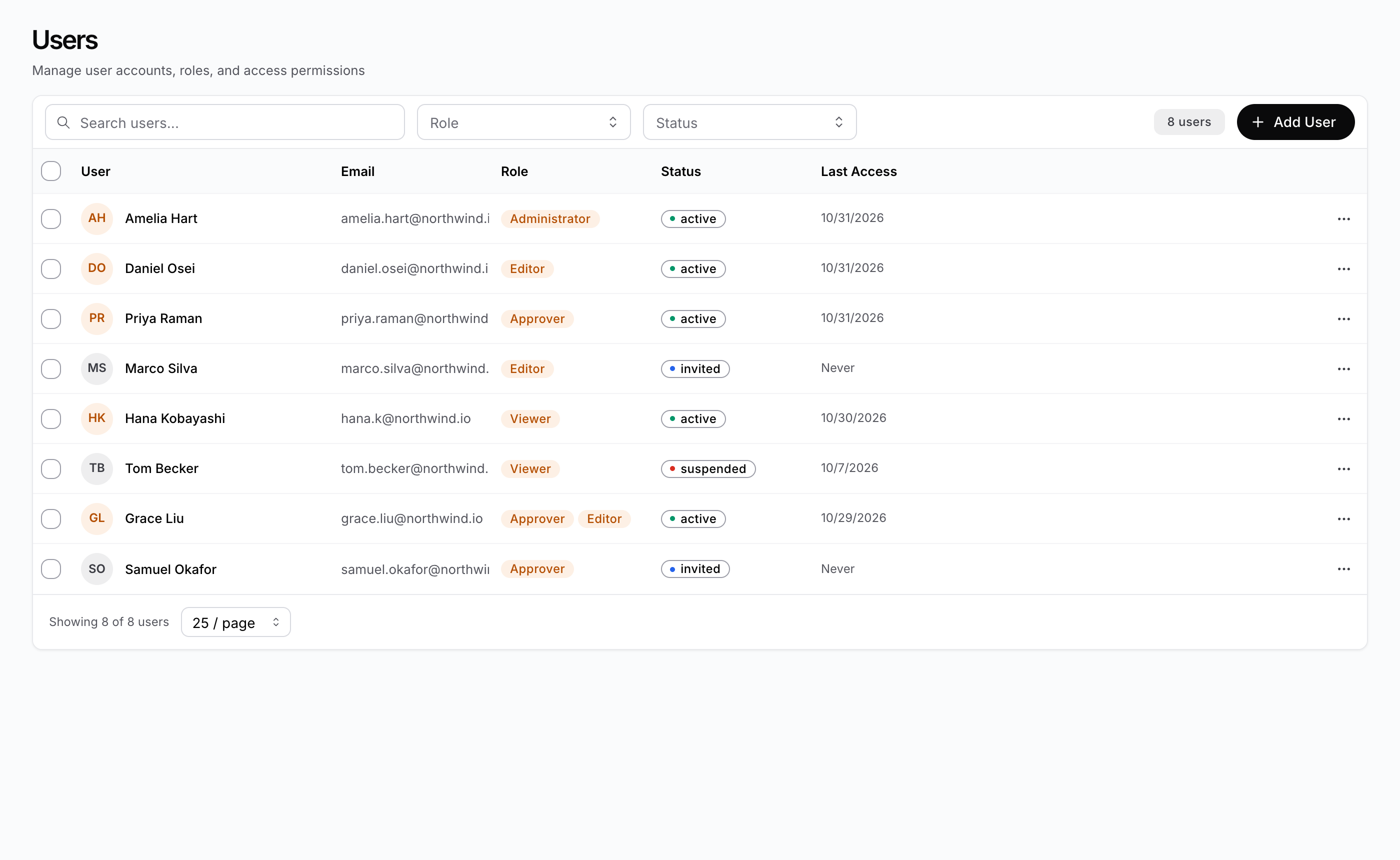
The pieces
| Piece | Package | Role |
|---|---|---|
UsersManager / UserDetail | @buildpad/ui-users | User list + create/edit with role assignment and policy attachment |
RolesManager / RoleDetail | @buildpad/ui-users | Role list + create/edit with hierarchy, scope rules, membership, and policies |
PoliciesManager / PolicyDetail | @buildpad/ui-users | Policy list + create/edit with access flags and the permissions matrix |
SystemPermissions | @buildpad/ui-interfaces | The per-collection CRUD-S permissions matrix (reused inside PolicyDetail) |
PermissionDetailModal | @buildpad/ui-interfaces | Tabbed custom-permission editor (item filters, field access, validation, presets) opened from the matrix |
TokenInput | @buildpad/ui-users | Static-token field — a thin wrapper over the system-token interface that swaps in client-side generation (copy-once plaintext, “Value Securely Saved” concealment, clear-to-revoke) |
SystemToken | @buildpad/ui-interfaces | The underlying token interface (server-side generation by default; accepts a custom generate producer) |
SelectIcon / IconDisplay | @buildpad/ui-interfaces | Icon picker for roles and policies, plus the read-only renderer the lists use — both driven by the same icon map, so anything pickable displays correctly |
SearchInput / ListFooter / ListEmptyState / RowActionsMenu | @buildpad/ui-users | Shared list chrome used by all three managers (search box, “Showing N of M” + page-size + pagination footer, empty/error states, row kebab menu) |
ModuleAccessKeysManager | @buildpad/ui-users | The registry of module-level access keys that policies can grant |
useUsers / useRoles / usePolicies / useAccess | @buildpad/hooks | CRUD, bulk role membership, and policy attach/detach against /api/users, /api/roles, /api/policies, /api/access |
This recipe is opt-in — it is not part of bootstrap. Generate the
module with buildpad add users-routes; it pulls in the users-management
component (which in turn pulls the system-permissions, select-icon, and
system-token components and the types / hooks / services lib modules). In a generated
app the imports point at your local copies (@/components/ui/users-management,
@/lib/buildpad/hooks); when consuming the packages directly, import from
@buildpad/ui-users and @buildpad/hooks instead.
Install
Add the module
buildpad add users-routesThis copies seven page shells into app/[lang]/(authenticated)/ (users/,
roles/, policies/, and module-access-keys/), the components into components/ui/users-management/, the
system-permissions, select-icon, and system-token interfaces into
components/ui/, and the
useUsers / useRoles / usePolicies / useAccess hooks into
lib/buildpad/hooks/. It also adds Users, Roles, and Policies to
the sidebar under an Administration group
(components/layout/navigation.ts — see
App Shell); entries are matched
by href, so re-runs never duplicate and your edits are preserved.
Add the API routes
The module talks to your DaaS through proxy routes. If you haven’t already added them, run:
buildpad add api-routesThe module uses app/api/users/* (including /api/users/bulk-update and
/api/users/[id]/policies), app/api/roles/*, app/api/policies/*,
app/api/permissions/*, and app/api/collections/* (the matrix lists your
collections).
The routes
Seven files give you the whole module. They live under the (authenticated)
route group, so they render inside the App Shell:
app/[lang]/(authenticated)/
├── users/
│   ├── page.tsx            # /users              — the UsersManager list
│   └── [id]/page.tsx       # /users/[id]         — UserDetail (use /users/new to create)
├── roles/
│   ├── page.tsx            # /roles              — the RolesManager list
│   └── [id]/page.tsx       # /roles/[id]         — RoleDetail (use /roles/new to create)
├── policies/
│   ├── page.tsx            # /policies           — the PoliciesManager list
│   └── [id]/page.tsx       # /policies/[id]      — PolicyDetail (use /policies/new to create)
└── module-access-keys/
    └── page.tsx            # /module-access-keys — the ModuleAccessKeysManager registry
The list views
Each list page renders its manager wired to the router. Clicking a row opens
the detail page; “Add” navigates to the new sentinel route.
"use client";

import React from 'react';
import { useLocaleRouter } from '@/lib/i18n/navigation';
import { UsersManager } from '@/components/ui/users-management';

export default function UsersPage() {
  const router = useLocaleRouter();

  return (
    <UsersManager
      onUserClick={(user) => router.push(`/users/${user.id}`)}
      onCreateUser={() => router.push('/users/new')}
    />
  );
}
All three managers take the same shape of props: a row-click callback, a create
callback, pageSize (the initial page size, default 25),
pageSizeOptions (the footer selector’s choices, default [10, 25, 50, 100]),
hideHeader (suppress the built-in heading for embedded surfaces — the Add
button stays), and an overridable RBAC collection name
(usersCollection / rolesCollection / policiesCollection).
User avatars render the record’s avatar value verbatim as the image source
(initials fallback when absent or broken) — display only; avatar upload is out
of scope, matching the reference admin.
Load failures never masquerade as an empty list: each manager shows a “Failed to load …” state (with the API error) plus a red notification, and a failed row delete keeps the confirm dialog open with an error toast so the action can be retried or cancelled.
URL state (shareable views)
The list managers persist their settled state in the query string by default —
?search=…&role=<id>&status=active&sort=-email&page=2 on UsersManager, and
?search=…&sort=…&page=… on RolesManager / PoliciesManager — so a filtered
view can be shared, reloaded, or bookmarked. Writes replace the current history
entry (no history spam) and ride the built-in 300 ms search debounce;
Back/Forward and programmatic rewrites flow back into the components.
In a Next.js App Router app the writes go through router.replace, which the
DaaSProviderWrapper template registers with registerUrlStateWriter — this
is required, not optional: native history.replaceState is invisible to
useSearchParams and the router re-asserts its own URL over it, silently
dropping the parameters. If you have customised DaaSProviderWrapper, keep
that registration; in development the hook warns once when it detects Next.js
and no writer.
Turn it off for embedded surfaces with urlParams={false}, or namespace with
urlParamPrefix="users-" when two url-synced lists share one page. Defaults
stay off the URL entirely.
Sorting and bulk actions
The users list sorts server-side by User (first_name), Email,
Status, and Last Access; the policies list by Name. Click a header
to cycle ascending → descending → unsorted. Roles are always name-ascending —
the roles API ignores the sort param, so RolesManager deliberately offers
no sorting UI. Sortable fields are whitelisted (arbitrary columns would error
server-side), and sorting works for read-only users too.
When the current user may update or delete users, each UsersManager row gets
a selection checkbox (plus select-all-on-page). Selecting rows reveals a
toolbar with:
- Update roles… — stage roles to add and/or remove, applied in a single
PATCH /api/users/bulk-updatecall. - Set status — the bulk-update endpoint only handles roles, so status
changes fan out as one
PATCH /api/users/[id]per selected user (Promise.allSettled, with a success/failure count notification). - Delete — confirmed with the selection count, then fans out one
DELETE /api/users/[id]per user.
The selection survives page changes but clears when the search or filters change and after every bulk action.
The detail views
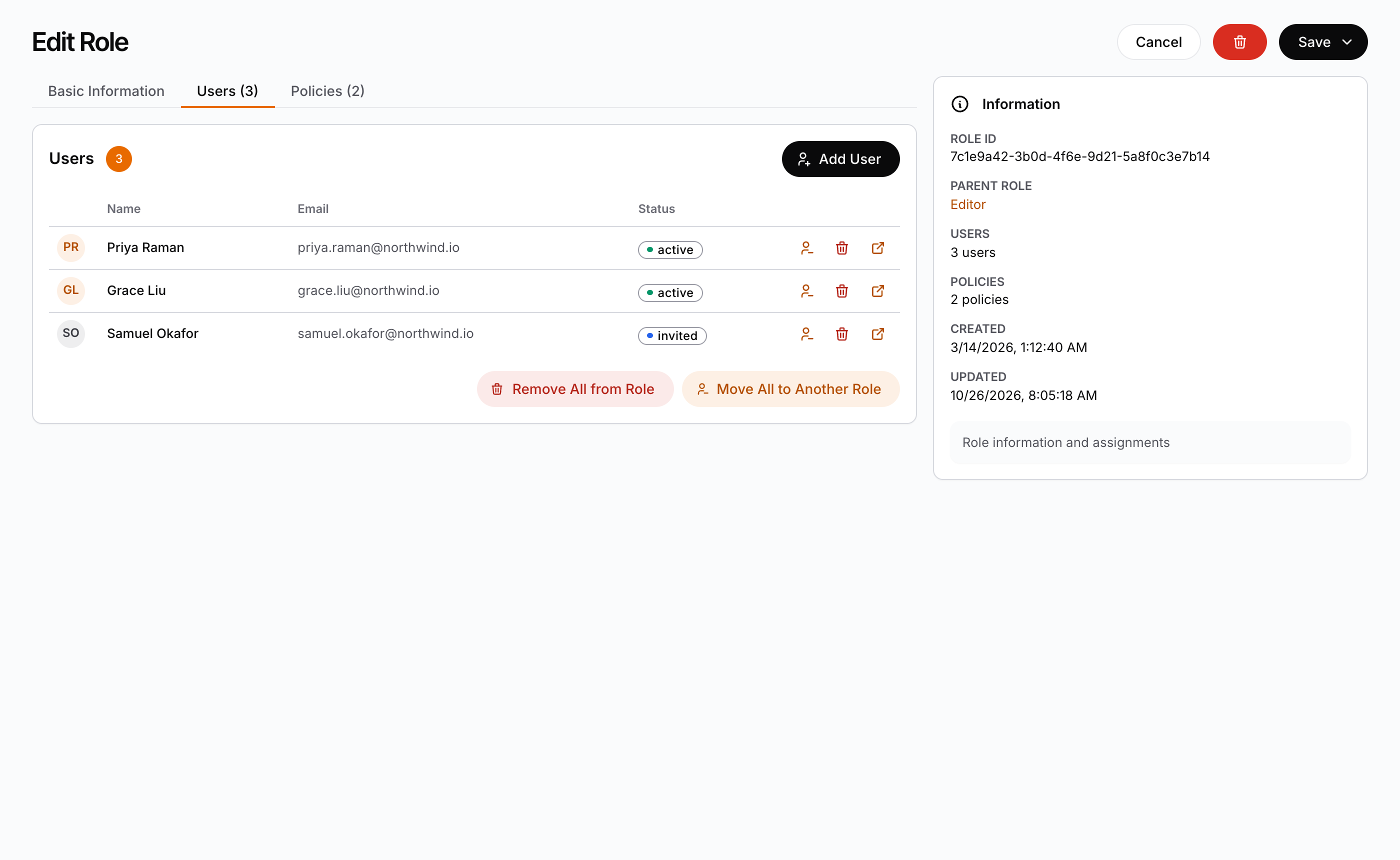
Detail pages read the route param (with 'new' meaning create) and hand
navigation back to the router. RoleDetail’s Save menu reports which action
the admin chose:
"use client";

import React, { use } from 'react';
import { useLocaleRouter } from '@/lib/i18n/navigation';
import { RoleDetail } from '@/components/ui/users-management';

export default function RoleDetailPage({
  params,
}: {
  params: Promise<{ id: string }>;
}) {
  const { id } = use(params);
  const router = useLocaleRouter();

  return (
    <RoleDetail
      id={id}
      onBack={() => router.push('/roles')}
      onDeleted={() => router.push('/roles')}
      onSaved={(role, action) => {
        if (action === 'quit') router.push('/roles');
        else if (action === 'addNew') router.push('/roles/new');
        else if (id === 'new') router.push(`/roles/${role.id}`);
      }}
      onUserClick={(user) => router.push(`/users/${user.id}`)}
      onPolicyClick={(policy) => router.push(`/policies/${policy.id}`)}
      onRoleClick={(role) => router.push(`/roles/${role.id}`)}
    />
  );
}
Navigate after a create. A detail component does not navigate. After a
successful create it goes on as the editor of the stored record: a further
Save updates that record, and does not create a second one (PolicyDetail
shows the permissions matrix from then on). The URL still says /roles/new,
though, and a reload would open an empty form. onSaved receives the saved
record with its new id. Navigate there to the list or to the record’s own
route, as the generated pages do: /users after a user is saved,
/roles/${role.id} after Save & Stay, /policies/${policy.id} after a
policy is created. After Save & Add New on a new role, RoleDetail becomes
an empty form for the next role, so a page that is already on /roles/new
has nowhere to go.
onRoleClick powers the sidebar’s hierarchy links (parent role and Child Roles
card). Omit it and the hierarchy renders as plain text. Children are derived
client-side from the fetched roles list — the DaaS API has no reverse
children relation.
The module access keys
/module-access-keys renders ModuleAccessKeysManager, the registry of
application capability flags (daas_module_access_keys). Policies grant these
keys as a second permission dimension next to per-collection CRUD: every key
registered here becomes a toggle on the Module-Level Access tab of
/policies/[id]. Admins and users with read permission on
daas_module_access_keys can open it.
"use client";

import React from 'react';
import { ModuleAccessKeysManager } from '@/components/ui/users-management';

export default function ModuleAccessKeysPage() {
  return <ModuleAccessKeysManager />;
}
users-routes does not add this page to the sidebar. Add a navigation.ts
entry for it if your admins need one.
The data layer
All screens are thin — the work lives in hooks you can reuse anywhere.
useUsers returns fetchUsers (page/search/role/status filters), getUser,
getMe, createUser, updateUser, updateMe, deleteUser,
bulkUpdateUsers (role membership across many users), and the policy
attachment trio fetchUserPolicies / attachUserPolicy / detachUserPolicy:
const { fetchUsers, bulkUpdateUsers } = useUsers();

const { users, total } = await fetchUsers({ role: roleId, status: 'active' });
await bulkUpdateUsers(users.map(u => u.id), { addRoles: [editorRoleId] });
useRoles mirrors it for roles (fetchRoles with includeUsers counts,
getRole with includePolicies, getMyRoles, CRUD, and
fetchRolePolicies / attachRolePolicy / detachRolePolicy). usePolicies
covers policy CRUD (list rows include userCount / roleCount), and
useAccess exposes the raw daas_access junction for advanced flows.
fetchUsers and fetchPolicies accept a Directus-style sort param
('email' / '-email') — that’s what the sortable list headers drive.
bulkUpdateUsers covers role membership only; the managers’ bulk status and
bulk delete fan out through updateUser / deleteUser per selected user.
admin_access on users and roles is computed, never written. Whether a
user is an admin is derived from the policies reachable through their roles and
direct attachments. To grant admin, attach a policy with admin_access: true
— don’t try to PATCH the field (the hooks strip it defensively; the API rejects
it). The same applies to app_access on roles.
Custom permission rules
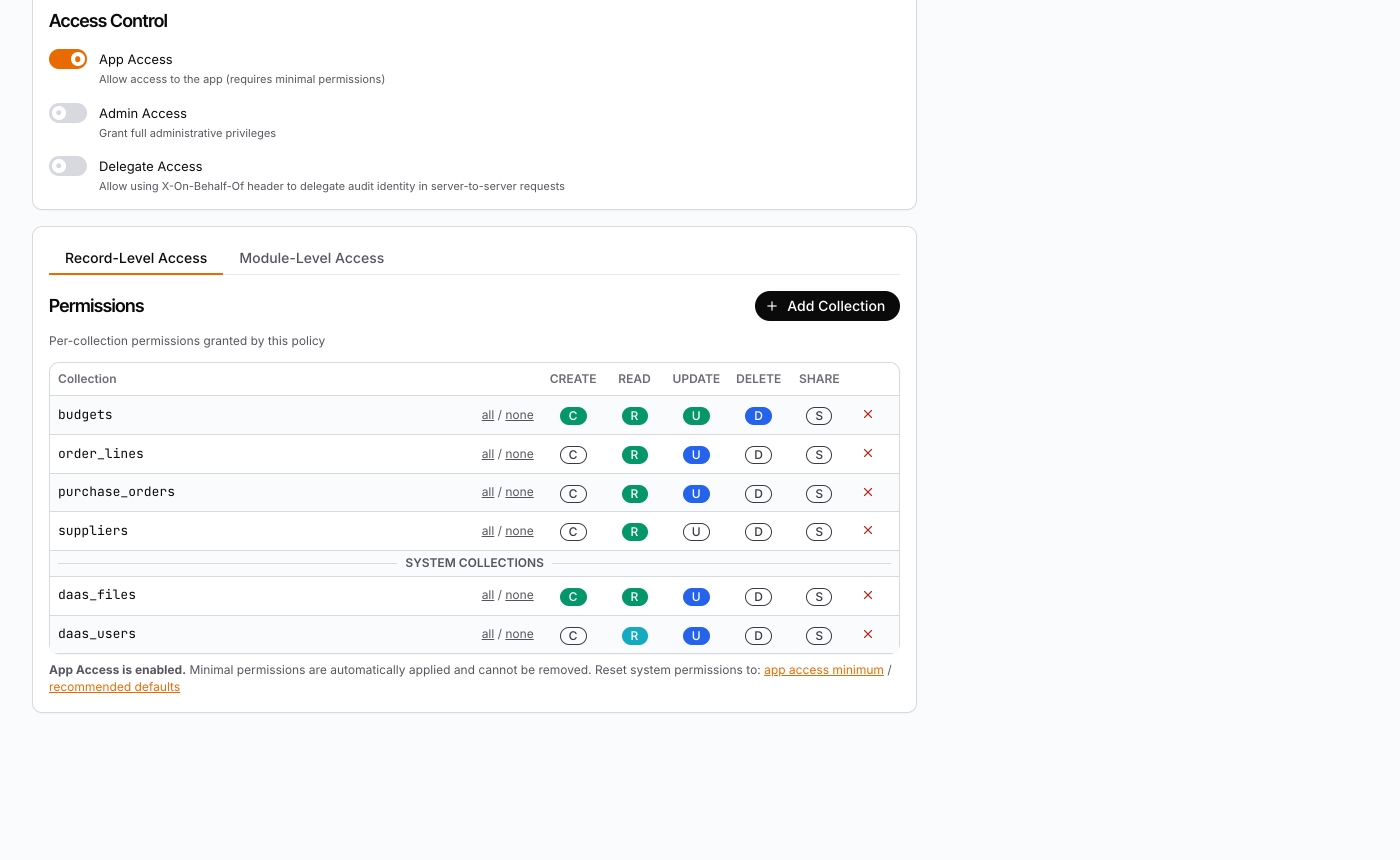
Beyond the matrix’s All / None toggles, each cell’s menu has Use Custom, which opens a tabbed editor for that collection/action pair. The tabs depend on the action (matching Directus semantics):
| Tab | Actions | Stores |
|---|---|---|
| Item Permissions | read / update / delete / share | A Directus filter limiting which items the action applies to (permissions) |
| Field Permissions | create / read / update | Which fields are accessible — checkbox list, ['*'] means all (fields) |
| Field Validation | create / update | Filter-syntax rules checked before the write is allowed (validation) |
| Field Presets | create / update | Default values applied automatically on the write (presets) |
Filter and validation rules use standard Directus filter syntax and support the
dynamic variables $CURRENT_USER, $CURRENT_ROLE, $CURRENT_ROLES,
$CURRENT_POLICIES, $NOW, and $CURRENT_RESOURCE_URI:
{
  "_and": [
    { "status": { "_eq": "published" } },
    { "user_created": { "_eq": "$CURRENT_USER" } }
  ]
}
Edits stay local to the matrix’s dirty state — like the All/None toggles, they
are applied to /api/permissions only when the admin hits Save on the
policy. Filters using _has, dot-notation, or _some/_none show a warning:
relational rules fall back to a two-step query on child mutations.
Cells required by App Access minimal permissions render cyan and are
extendable but irrevocable: their menu offers All Access and Use
Custom (add item filters, validation, or presets on top of the minimum) but
never No Access, and the enforced minimal fields stay checked and locked in
the editor. The field lists come from app/api/fields/* and
app/api/relations (included in api-routes).
RBAC behaviour
- Every action is gated with
usePermissions().canPerform(collection, action)(admins bypass): the Add buttons, row menus, and Save/Delete buttons hide when the current user lacks the corresponding permission ondaas_users,daas_roles, ordaas_policies. - Until the permissions are known, no write control is drawn and the forms
take no edit: no Add button, no row menu, no selection column, a row that
does not open its record, no Save or Delete button, and a covered form. The
controls appear when the answer is in, so a user without a right does not
see its button first. A
newroute does not open its form before then. Reading does not wait: the lists and the records load at once. A later refresh of the permissions (a renewed token, another scope) keeps the controls as they were until its answer is in. - Bulk selection follows the same gates: the checkbox column only renders with
updateordeletepermission, and within the toolbar “Update roles…” / “Set status” are update-gated while “Delete” is delete-gated. Column sorting is read functionality and is never permission-gated. - The module is admin-oriented — gate your navigation links with
usePermissionstoo, so non-admins never see/users. - A user’s
rolescome back scope-filtered: in multi-tenant setups thedaas_user_rolesjunction is tagged with aresource_uri, and role assignments cascade to child scopes. - Invitations are modelled with
status: 'invited'— there is no separate invite endpoint. Create the user with theinvitedstatus (password can be set via the reset flow later).
Prerequisites
- The module must live under your authenticated layout so
DaaSProvideris above it —buildpad initgenerates this asapp/[lang]/(authenticated)/with aDaaSProviderWrapper. - Deleting a user also deletes their auth account; the confirm modals make destructive actions explicit.
- No extra styling is needed: the components consume the design tokens through the Mantine theme. See the Styleguide for the token reference.
See the components live
Every surface of the Users module is in the Users Storybook. Run it locally
with pnpm --filter @buildpad/ui-users storybook (port 6011). The
Live DaaS stories of UsersManager, RolesManager and PoliciesManager
connect to a real DaaS instance through the storybook-host proxy and include
in-story list ↔ detail navigation.