Comments Module Recipe
The Comments module puts a discussion on any record — a ticket, a document, an order, a page. It shows the comments as threads, lets people answer any comment at any depth, and lets them react with an emoji.
- Threads. Every comment has a Reply button, not only the top one. Each level is indented a little less than the one before (41 px for the first, 22 px for each deeper one), so a long thread stays on screen.
- A comment box with bold, italic, underline, bulleted lists and an emoji picker. Ctrl Enter (⌘ Enter on macOS) sends, Esc cancels a reply, and Enter inside a bullet starts the next one.
- @Mentions. Type
@and a name: people are searched after a short pause, ↑ ↓ move, Enter or Tab chooses, Esc closes the list. A mention is stored in the text as@[Name](user:<uuid>)and shown as a chip; a mention of you stands out. - Pictures. A picture button, and paste from the clipboard (a screenshot
works). PNG, JPEG, GIF or WebP up to 10 MB, at most 20 per comment, shown as
thumbnails that open a viewer with previous, next and ← →.
A picture alone is a valid comment. They are uploaded to the Files API and
stored as file ids in
photos. - Reactions. Twelve fixed emoji, one chip per emoji in use with its count, highlighted when it is yours, with the names in the tooltip. They change at once and roll back if the server refuses.
- No blank screen. Posting, replying and reacting never clear the list. It stays on screen and is replaced quietly when the server has answered.
- Safe text. A comment is drawn as React nodes only. Anything that is not one of the marks stays plain text, so a comment cannot inject markup.
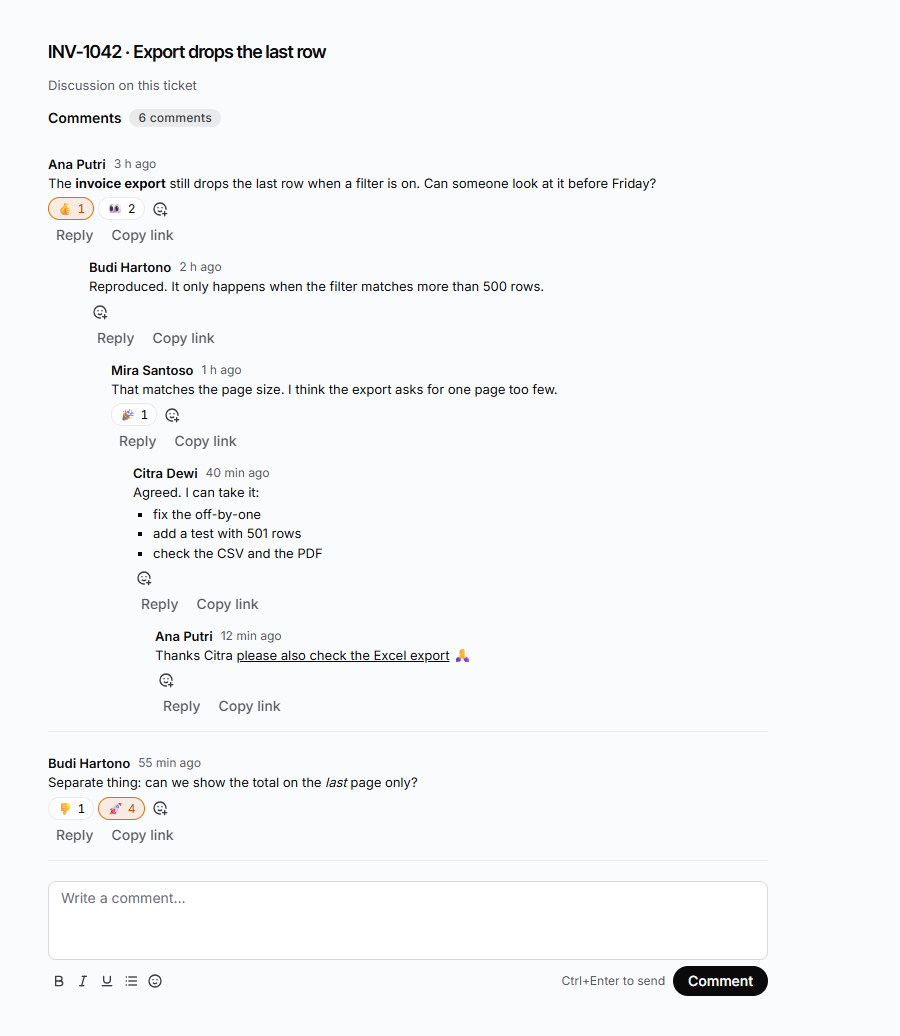
This version covers threads, formatting, emoji, @mentions, pictures and reactions on
the screen, and ships the DaaS code for the notification emails (a mention emails the
person mentioned, a reply emails the author answered) as a service and two hooks you paste
into your DaaS. See Notification emails. The
add-comments skill describes the full
standard comment field.
The pieces
| Piece | Role |
|---|---|
CommentsKit | The thread, the comment box and the reactions for one record |
itemsAdapter | The default adapter: reads and writes through your app’s /api/items/... routes |
CommentsAdapter | The interface the kit talks to; write your own for another data source |
useComments | The state behind the kit (list, quiet refetch, optimistic reactions), for a shell of your own |
Composer, CommentMessage, ReactionBar, EmojiPicker, CommentBody | The parts, for a shell of your own |
| Strings | The comments namespace of @buildpad/utils (English and Bahasa Indonesia) |
Install
Add the component
buildpad add commentsThis copies 22 files into components/ui/comments/ and installs
@mantine/core, @mantine/hooks and @tabler/icons-react if they are missing,
plus the services and utils lib modules it needs. In a generated
app the imports point at your local copy (@/components/ui/comments). The
component is opt-in: it is not part of bootstrap.
Create the collections
The kit needs two collections next to the record it comments on: the comments,
and their reactions. Nothing creates them for you. The package ships a
description of both — fields, foreign keys, permissions and the unique index —
in packages/ui-comments/schema/comments.schema.json. Create them with your
backend’s own tools, and create every foreign key with a relation call: a
field with a relation block does not create the constraint.
| Collection | Columns |
|---|---|
<host>_comments | id, <host> (the record), parent, root, author, body, photos, created_at, optionally resolved |
<host>_comment_reactions | id, target_comment, emoji, reacted_by, created_at |
Give target_comment an alias on the comments collection named reactions
(a one-to-many field), so one read can nest reactions.id, reactions.emoji
and reactions.reacted_by with each comment. Prove the cascade by deleting a
throwaway parent comment and counting its child rows.
parent and root are set to CASCADE here, so deleting a comment deletes its
replies, which is what the kit’s “Delete this comment and its replies?” says.
The add-comments skill uses SET NULL; with that, the replies of a deleted
comment would become top-level comments.
Add the create hooks
The browser sends only the record, parent, body and photos. A create hook
on each collection stamps the author, the thread root (parent.root ?? parent.id),
the access and the time, trims and bounds the text, and checks the reaction’s
emoji against the fixed list. Write them once per project; the code is in step 3
of the add-comments skill, and uses
only services.items.
Permissions: read comments by the same rule as the record; create with only the
columns above; no update or delete unless you enable edit or delete below.
On reactions, delete only where reacted_by is the signed-in user.
Mount it
'use client';

import { useMemo } from 'react';
import { CommentsKit, itemsAdapter } from '@/components/ui/comments';

export function TicketComments({ ticketId, user }: { ticketId: string; user: { id: string; name: string } }) {
  const adapter = useMemo(
    () =>
      itemsAdapter({
        collection: 'ticket_comments',
        reactionsCollection: 'ticket_comment_reactions',
        hostField: 'ticket',
        hostId: ticketId,
        meId: user.id,
        linkFor: (commentId) => `${location.origin}/tickets/${ticketId}?comment=${commentId}`,
      }),
    [ticketId, user.id]
  );

  return <CommentsKit adapter={adapter} meId={user.id} meName={user.name} />;
}
Keep the adapter stable (useMemo): the kit reloads when it gets a different
one, which is how it switches to another record. itemsAdapter calls
apiRequest, so it works whether the app talks to DaaS through its own
/api/items/... routes or directly, as DaaSProvider is set up.
What the adapter decides
A method an adapter leaves out switches that feature off:
| To get | Give the adapter |
|---|---|
| @Mentions | mentions: true (searches /api/users), or a function (query) => Promise<Person[]> |
| Pictures | images: true (uploads to /api/files, shows /api/assets/<id>), images: { folder } to choose the folder, or images: { upload } to replace the upload |
| Reactions | reactionsCollection (without it the chips are not shown) |
| Edit your own comment | allowEdit: true |
Delete (your own, or anyone’s with canModerate) | allowDelete: true |
| Resolve and reopen a thread | fields: { resolved: 'resolved' } |
| Copy link | linkFor |
Comments are immutable by default: a correction is a new reply.
Props of CommentsKit
| Prop | Meaning |
|---|---|
adapter | Where the comments come from (required) |
meId, meName | The signed-in user: their comments are theirs to edit, and their name shows on their own reactions (required) |
canComment | false for a read-only viewer: the list and chips stay, the box and Reply go. Default true |
canModerate | May delete and resolve anyone’s comment. Default false |
focusId | Scroll to and highlight a comment (from a ?comment= link) |
newIds | Comments to mark New |
title | Replaces the heading |
onError | Called after a failed load, save, reaction or delete, besides the message the kit shows |
translations | Overrides for the strings |
Other column names
itemsAdapter defaults to the names of the add-comments skill. Map your own
with fields:
itemsAdapter({
  // …
  fields: {
    parent: 'reply_to',
    createdAt: 'made_at',
    reaction: { reactedBy: 'user_id' },
  },
});
Mentions: what the server must do
The browser only writes the token. Who may be mentioned is the server’s job: the
create hook of the add-comments skill rewrites the token of anyone who may not
read the record into plain @Name, so a forged id notifies nobody. The picker
searches /api/users (active users), so it can offer people who cannot read the
record; pass your own mentions function to narrow it. At most 10 distinct people
become mentions in one comment; the rest stay plain text. The text is the source of
truth: there is no separate mentions column. A name inside a token is the name on
the day it was written.
Pictures: what to know
- Where they go.
itemsAdapter({ images: true })posts each picture toPOST /api/filesas multipart (the same route the files module uses) and keeps the returned file id. The comment stores the ids inphotos; the thumbnails and the viewer load/api/assets/<id>, resized for the thumbnail. - What is accepted. The browser checks the type (PNG, JPEG, GIF, WebP; SVG is refused, because it can carry script), 10 MB and 20 pictures, and says why when it refuses one. A refused picture does not stop the others in the same choice. Send waits while a picture is still uploading.
- The server must check too. The create hook bounds
photos(a list of at most 20 strings), as in step 3 of theadd-commentsskill. The browser checks are for the person typing, not for security. - Who can see a picture is decided by the Files permissions of the viewer, not by who may read the comment. Anyone who may read that file can open it by its id.
- Deleting a comment does not delete its pictures. The files stay in the library; clean them up with your own job if that matters.
- Editing changes the text only. Pictures cannot be added to or taken off a posted comment.
Notification emails
Emails are sent by the DaaS, not by the browser. The package ships three small files in its
schema/ folder (and in the npm package): a custom service, services/comment_mail.js, and two
action hooks, hooks/notify-on-mention.hook.js and hooks/notify-on-reply.hook.js. They are
pasted into your DaaS; buildpad add comments does not copy them. The folder’s README.md has
the install steps; in short: edit CONFIG at the top of the service, expose APP_URL to services
(RUNTIME_ENV_WHITELIST_CUSTOM_SERVICE), create the service, then the two hooks on
<your comment collection>.items.create, with SMTP configured.
| When | Who is emailed |
|---|---|
| A comment mentions people | Each person mentioned (at most 10): “Ana mentioned you in “Title””, with the comment, what it replies to and an Open the comment button |
| A comment answers another | The author of the comment answered: “Ana replied to your post in “Title”” |
- Never the author themself, and never twice for one comment. A person a reply already mentions gets the mention email only. The hooks fire once, on create: editing a comment emails nobody.
- Skipped, not failed: people who are not
active, who have no email, or whose address cannot receive mail (.test,example.com,daas.internal, a service account). - The comment is never affected. The hooks run after the write and catch every error. A mail
server that is down loses the email, not the comment. Failures are written to the DaaS log
(
/logs); a failed email is not retried, and there is no record of what was sent. - Safe HTML. Every value in the email card is escaped; the text part is plain text.
- Nothing is sent until you say who may be emailed. As shipped, the service fails closed and logs
why. Set
CONFIG.mentionsCheckedByCreateHook: truewhen your create hook already turns the mention of anyone who may not read the record into plain text, or fill inCONFIG.canReadwith your own access rule. - The commenter’s address stays private. Emails have no Reply-To unless you set
CONFIG.replyToAuthor: true, which shows the commenter’s address to everyone emailed. - Everyone is emailed at once. Mentions are sent in parallel, so a slow mail server cannot run out the service’s time limit partway down the list.
These files were tested by running them in a sandbox built like the DaaS’s own, against fake services, with deliberate bugs to prove the tests fail when they should. They have not been run against a real DaaS or mail server. Send a test mention and a test reply between two real accounts before relying on them.
How it loads
A whole thread is read in two requests however deep it is: the top-level
comments, then every reply whose root is one of them (in groups of 40 ids), with
the reactions and the authors nested. A reply whose parent is not loaded stays at
the top and says so. Replies deeper than 40 levels are not drawn.
Strings
Every word comes from the comments namespace of the shared dictionary, in
English and Bahasa Indonesia. Override them with BuildpadI18nProvider or the
translations prop.
Not in this version
- An unread marker for mentions and a Mentioned page. The mention itself is stored, shown as a chip, and emailed (see above), but nothing tracks whether it was read.
- A record of the emails sent, or a retry of a failed one.
- Guests on a public link, and highlight or pin anchors on a document.