Forms Module Recipe
The Forms module is a ready-made /forms experience — a visual form builder
plus a runtime renderer on top of the schema-driven
CollectionForm. An admin arranges a
collection’s fields into ordered sections, sets width / required / readonly /
hidden, and authors conditional logic, then saves the result as a reusable, named
form definition. Definitions are stored as items in an ordinary
collection and merged onto the live schema at render time via
buildFieldsFromDefinition — the schema is never mutated.
It gives you four routes:
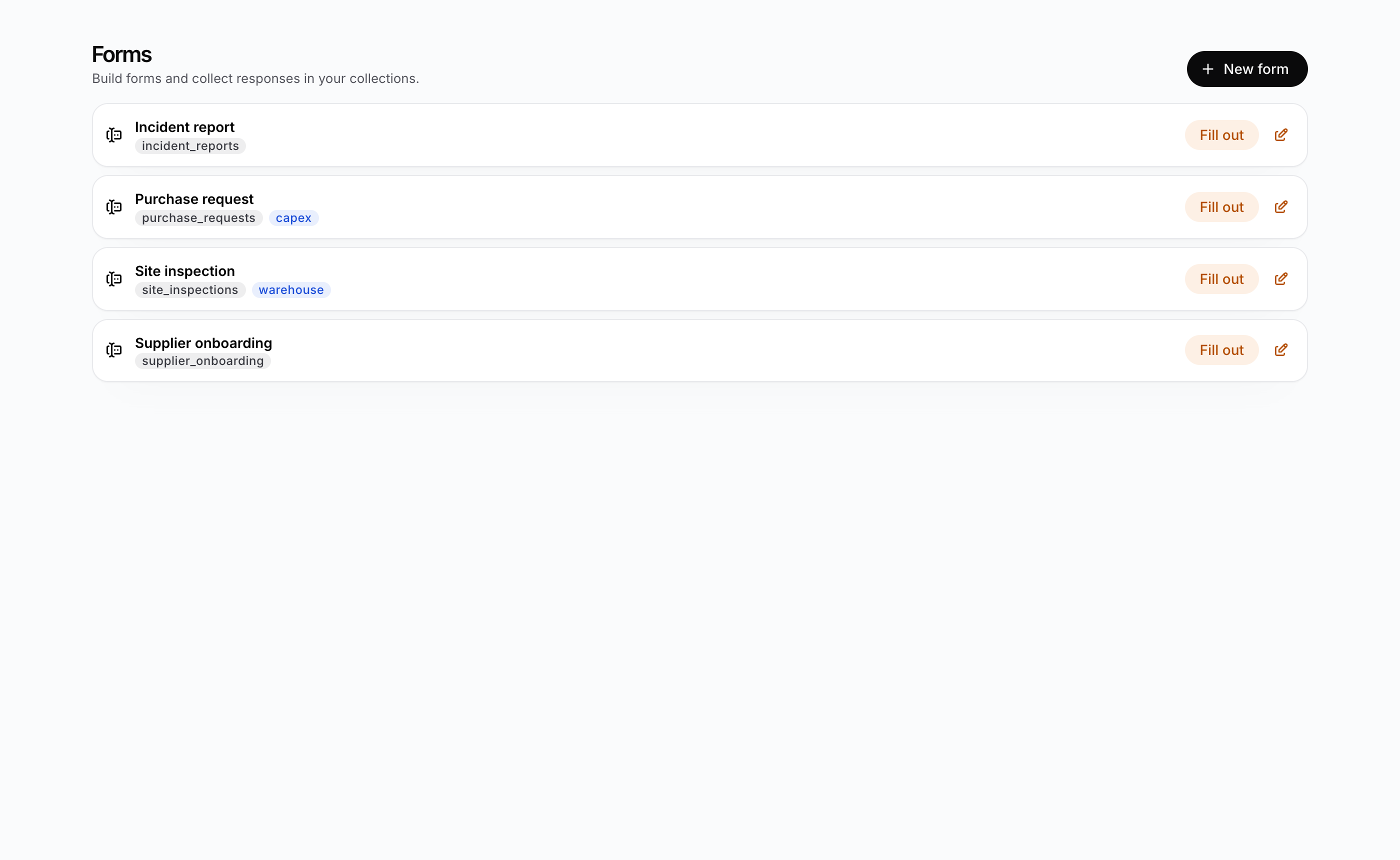
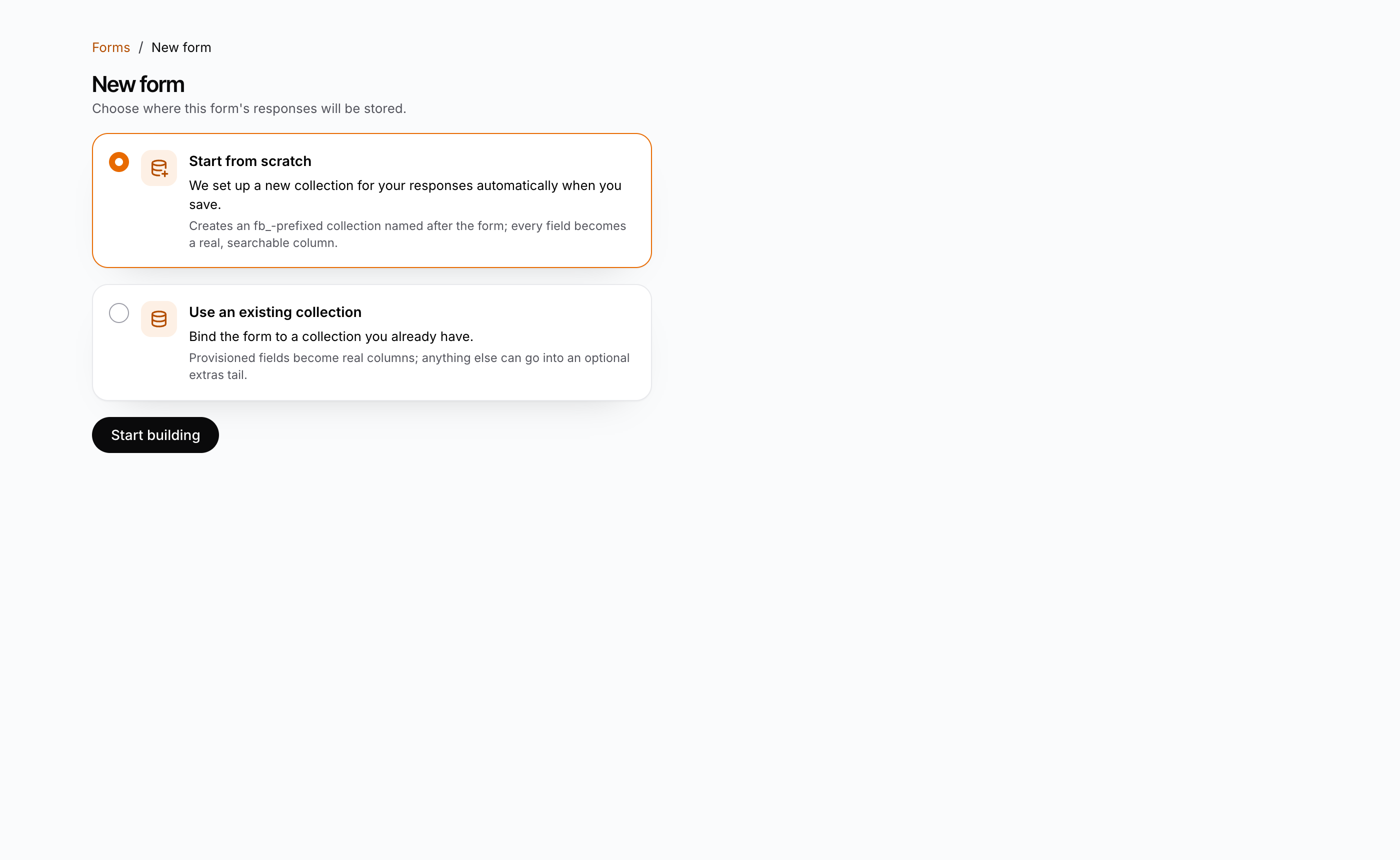
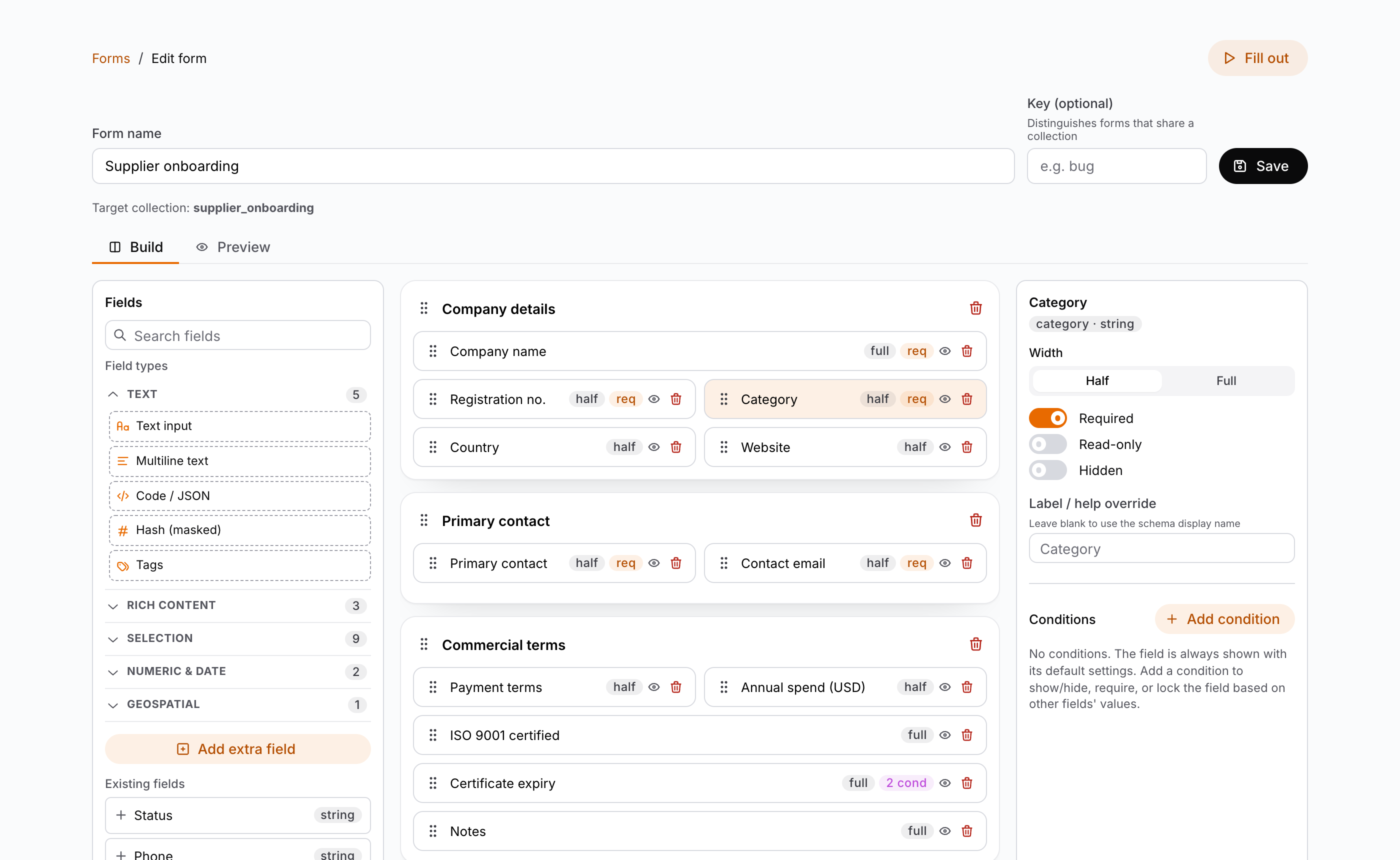
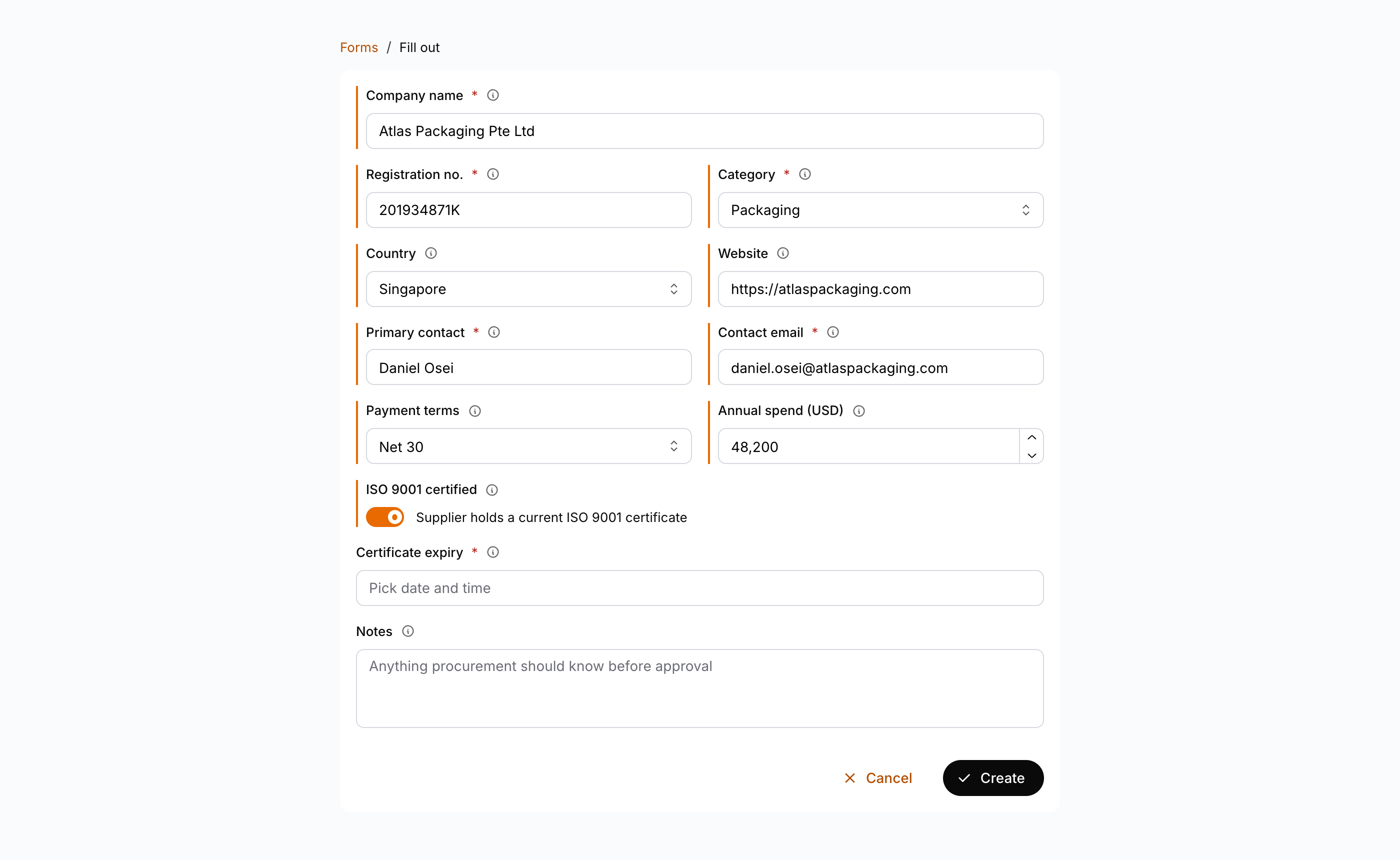
/forms— the list of saved forms, each linking to the builder (edit) and the fill-out page./forms/new— create a form: Start from scratch (auto-create a newfb_-prefixed collection on save) or Use an existing collection (bind to one you already have)./forms/[id]— the visualFormBuildereditor (palette / canvas / settings, with a live Preview tab)./forms/[id]/fill— renders the form withDynamicFormto create a real item in the target collection.
The pieces
| Piece | Package | Role |
|---|---|---|
FormBuilder | @buildpad/ui-forms | Three-pane authoring UI (palette / canvas / settings) with a live Preview tab; loads/saves definitions |
DynamicForm | @buildpad/ui-forms | Runtime renderer — loads a definition by id and renders it as a create/edit form |
FormPreview | @buildpad/ui-forms | Live preview of an in-memory (unsaved) definition |
ConditionsEditor | @buildpad/ui-forms | Authors FieldCondition[], reusing FilterPanel for the rule builder |
FormsEmptyState | @buildpad/ui-forms | Prerequisite-collection hint (+ one-click Create collection with schema rights) |
useFormDefinitions | @buildpad/hooks | list / get / create / update / remove over the definitions collection, plus resolveScreen (the API keeps the legacy screen name for a resolved definition) |
This recipe is opt-in — it is not part of bootstrap. Scaffold it with
buildpad add form-builder forms-routes; the forms-routes module drops the
/forms pages and the form-builder component copies the builder + renderer into
components/ui/form-builder/ (pulling the collection-form and filter-panel
components and the types / hooks / services / utils lib modules). The code
below is that generated module. In a generated app the imports point at your local
copies (@/components/ui/form-builder, @/lib/buildpad/hooks); when consuming the
packages directly, import from @buildpad/ui-forms and @buildpad/hooks instead.
Prerequisite: the definitions collection
Form definitions are persisted as items in a single collection (default
fb_definitions). It is an ordinary user collection — not a
daas_-prefixed system collection — and must exist before the builder can save:
| field | type | notes |
|---|---|---|
id | uuid (PK) | auto |
name | string | form name |
target_collection | string | collection the form targets |
key | string (nullable) | optional discriminator for forms that share a collection (e.g. per issue type) |
definition | json | the FormDefinition body |
If the collection is missing, the list and builder render a FormsEmptyState
hint describing exactly this instead of failing. With DaaS schema rights that
hint also offers a one-click Create collection action, so you never have to
leave the app.
Authoring (arranging existing fields) needs only item create/update/read on
the definitions collection plus read on the target collection’s schema — not
admin/DDL rights. Only provisioning — creating the definitions or target
collection, or a new real column — needs schema rights.
Install
Add the module
buildpad add form-builder forms-routesThis copies the builder + renderer into components/ui/form-builder/, the
/forms page shells into app/[lang]/(authenticated)/forms/, and the useFormDefinitions hook into
lib/buildpad/hooks/.
Add the API routes
The module talks to your DaaS through proxy routes. If you haven’t already added them, run:
buildpad add api-routesThis includes the /api/items/* routes the definitions and fill flows use. In
proxy mode, provisioning also uses the DDL write proxies from this module —
POST /api/fields/[collection], POST/DELETE /api/collections[/…] — which
require DaaS schema rights. On the default direct deployment the browser calls
DaaS directly, so no extra routes are needed.
The routes
Four files give you the whole module. They live under the (authenticated)
route group, so they render inside the App Shell:
app/[lang]/(authenticated)/forms/
├── page.tsx            # /forms          — list of saved definitions
├── new/page.tsx        # /forms/new      — create (auto-create or bind existing)
├── [id]/page.tsx       # /forms/[id]     — the FormBuilder editor
└── [id]/fill/page.tsx  # /forms/[id]/fill — render with DynamicForm to create an item
The examples below are trimmed to the wiring. The generated pages also add
breadcrumbs, loading states, and translated strings (app.forms.*).
The list view
app/[lang]/(authenticated)/forms/page.tsx loads definitions with useFormDefinitions().list() and, if
the collection is missing, renders FormsEmptyState. Each row links to the builder
and the fill page.
"use client";

import React, { useEffect, useState } from 'react';
import { useLocaleRouter } from '@/lib/i18n/navigation';
import { useI18n } from '@/lib/i18n/provider';
import { FormsEmptyState, type FormDefinition } from '@/components/ui/form-builder';
import { useFormDefinitions } from '@/lib/buildpad/hooks';

export default function FormsListPage() {
  const router = useLocaleRouter();
  const { t } = useI18n();
  const { list } = useFormDefinitions();
  const [definitions, setDefinitions] = useState<FormDefinition[]>([]);
  const [error, setError] = useState<string | null>(null);

  useEffect(() => {
    list()
      .then(setDefinitions)
      .catch((err: unknown) => setError(err instanceof Error ? err.message : t('app.forms.loadFailed')));
  }, []);

  if (error) return <FormsEmptyState error={error} />;
  // …a "New form" button (router.push('/forms/new')) and one row per definition,
  // linking to `/forms/${def.id}` and `/forms/${def.id}/fill`
}
Create a form
app/[lang]/(authenticated)/forms/new/page.tsx picks how the target collection comes to be, then hands
off to FormBuilder. Start from scratch passes no targetCollection (the builder
auto-creates a full fb_ collection on save); Use an existing collection binds to
one you already have. Non-admins (no schema rights) only see the existing collection
path.
import { FormBuilder } from '@/components/ui/form-builder';
import { useLocaleRouter } from '@/lib/i18n/navigation';

// inside the page component:
const router = useLocaleRouter();

// auto-create on save (needs schema rights):
<FormBuilder onSaved={(def) => router.push(`/forms/${def.id}`)} />

// bind to an existing collection (hybrid storage):
<FormBuilder targetCollection="issues" onSaved={(def) => router.push(`/forms/${def.id}`)} />
The builder (edit)
app/[lang]/(authenticated)/forms/[id]/page.tsx loads a saved definition into FormBuilder by id — the
target collection comes from the definition. The Build tab is a three-pane
workspace — a field-type palette (plus Add extra field and any existing
collection fields) on the left, the section canvas in the middle, and a
per-field settings panel (width / required / hidden / conditions) on the right —
and a Preview tab renders the in-progress form live.
"use client";

import React, { use } from 'react';
import { FormBuilder } from '@/components/ui/form-builder';

export default function EditFormPage({ params }: { params: Promise<{ id: string }> }) {
  const { id } = use(params);
  // …breadcrumbs and a "Fill out" button (router.push(`/forms/${id}/fill`))
  return <FormBuilder definitionId={id} />;
}
The fill view
app/[lang]/(authenticated)/forms/[id]/fill/page.tsx renders the saved definition as a live create form
with DynamicForm. Submitting creates a real item in the target collection. Pass
itemId to edit an existing item instead.
"use client";

import React, { use } from 'react';
import { useLocaleRouter } from '@/lib/i18n/navigation';
import { DynamicForm } from '@/components/ui/form-builder';

export default function FillFormPage({ params }: { params: Promise<{ id: string }> }) {
  const { id } = use(params);
  const router = useLocaleRouter();
  return (
    <DynamicForm
      definitionId={id}
      onSuccess={() => router.push('/forms')}
      onCancel={() => router.push('/forms')}
    />
  );
}
Conditions
ConditionsEditor authors the exact FieldCondition[] shape the runtime already
consumes (apply-conditions.ts), so conditions evaluate without translation. Rules
are built with FilterPanel, producing DaaS-compatible filter JSON (_eq, _neq,
_in, _and, _or, …). When multiple conditions match, the last one wins
(DaaS convention).
Data storage & searchability
The form definition (the overlay JSON) is config; the form data (the
answers users submit) is what you later search and report on. This module stores
answers as real, typed DaaS columns by default — natively searchable, sortable,
aggregatable, relatable, and field-level-permissioned through the Items API — with
a single opt-in extras jsonb column as the escape hatch for the rare
non-searchable tail.
Two strategies, derived from the target collection’s schema:
| Strategy | When | Storage |
|---|---|---|
| Hybrid | Use an existing collection | Real columns for provisioned fields + one opt-in extras jsonb tail |
| Full | Start from scratch (needs schema rights) | Standard audit system fields + every field a real column, no extras |
The builder derives the strategy (a collection is full iff it has no extras
column) — nothing extra is persisted on the definition. Every field carries
store: 'column' | 'extras' (default 'column'); the Add field flow lets you
choose, and tick Index this column for fields you’ll filter or sort on.
Rule of thumb: if you’ll ever search / filter / sort / aggregate on a field,
keep it a real column. extras values are not server-searchable, -sortable,
or -aggregatable, and are not individually field-permissioned — reach for them only
for the display-only tail that never needs querying.
Because real-column answers are ordinary DaaS columns, the existing Items API is
the search layer — ItemsService.readByQuery(...) already speaks filter (20+
operators incl. relational dot-notation), sort, search, aggregate, and
groupBy. Model a Project → Issue hierarchy with real relations (an M2O
parent + a type discriminator) and a per-type form (definition key), and
query across it natively (e.g. filter[project][_eq]=…&filter[issue_type][_eq]=bug).
Multi-tenancy / scopes
- Data requests reuse the existing
DaaSProviderheader injection, so scoped reads/writes partition byX-Resource-Uriautomatically on the direct deployment. - For a scope-enabled target collection,
DynamicFormpasses the active scope URI as a create-time default unless DaaS permission presets already inject it. - Definitions follow a global-baseline + optional per-tenant-override model:
by default
fb_definitionsis unscoped (one form for all tenants); scope-enable it andresolveScreenpicks the nearest-ancestor-or-self definition per scope.
Prerequisites
- The module must live under your authenticated layout so
DaaSProvideris above it —buildpad initgenerates this asapp/[lang]/(authenticated)/with aDaaSProviderWrapper. The hooks call your/api/items/*(and, when provisioning in proxy mode,/api/fields/*and/api/collections/*) proxy routes. - No extra styling is needed: the components consume the design tokens through the Mantine theme. See the Styleguide for the token reference.
See the components live
Every state of the builder and renderer is in the Forms Storybook — FormBuilder,
DynamicForm, FormPreview, ConditionsEditor, and the supporting pieces. Run it
locally with pnpm --filter @buildpad/ui-forms storybook (port 6010). The
Live DaaS stories of FormBuilder and DynamicForm connect to a real DaaS
instance through the storybook-host proxy.